What Is Phishing? Types, Techniques, and Defenses
In September 2023, attackers did not exploit a single vulnerability to take down MGM Resorts. They made a phone call. The group known as Scattered Spider pulled an employee's details from social media, called the IT help desk pretending to be that person, and talked the agent into resetting the account password and its multi-factor authentication. With that one reset they were inside. They escalated to super-administrator rights in MGM's identity platform, reached into cloud services and more than a hundred virtualization hosts, and forced a shutdown that cost the company around $100 million. No malware opened the door. A person did, because someone asked convincingly.
That is phishing: an attack on the human instead of the machine. It is the most common way intrusions start, and it works because it skips the firewall entirely and targets the one part of the system that can be talked into things. Verizon's 2026 Data Breach Investigations Report attributes 62% of breaches to the human element, and finds phishing was the initial access in 16% of them.
This guide covers what phishing is and why it works, the anatomy of an attack, the full range of types from bulk email to voice and QR-code phishing, the techniques attackers use including the kits that defeat MFA, how phishing feeds the wider attack chain, how to defend against it, and how a SOC actually handles a reported phish. It is written for blue teamers who have to detect, triage, and respond to this every day.
What is phishing?
Phishing is a form of social engineering in which an attacker sends a fraudulent message designed to trick a person into revealing sensitive information, handing over credentials, running malware, or transferring money. The message impersonates someone the target trusts: a bank, an employer, a colleague, a vendor, a government agency.
The defining feature is the target. A technical exploit attacks software. Phishing attacks judgment. It manipulates the person into taking an action that hands the attacker what they want, which means no software patch closes the hole and no firewall rule blocks it at the source. The control surface is human attention.
That is also why it scales. Sending a million emails costs almost nothing, and a response rate of a fraction of a percent still yields thousands of victims. It is cheap to launch, hard to stop at the technical layer, and effective enough that it remains the front door to a huge share of breaches.
Why phishing works
It leans on a small set of psychological levers, and they are reliable because they are human, not technical.
- Authority. A message that appears to come from a CEO, the IRS, or IT support gets compliance that the same request from a stranger would not.
- Urgency. "Your account will be locked in one hour" pushes the target to act before they think. Speed is the enemy of scrutiny.
- Fear. A fake security alert or a threatened fine triggers a reaction that bypasses caution.
- Familiarity. A logo, a known sender name, a real ongoing project referenced in the message. The closer it looks to normal, the less it gets questioned.
The numbers show how well this works. Verizon's DBIR has repeatedly found that users who fall for a phishing email tend to do so within the first minute of opening it, faster than any security team can react. Awareness training helps but does not solve it: a small but stubborn percentage of recipients click every time. The 2026 DBIR also flags a shift in channel, with phone and SMS-based attacks succeeding at meaningfully higher rates than email campaigns, which is exactly the pattern the MGM attack followed.
The anatomy of a phishing attack
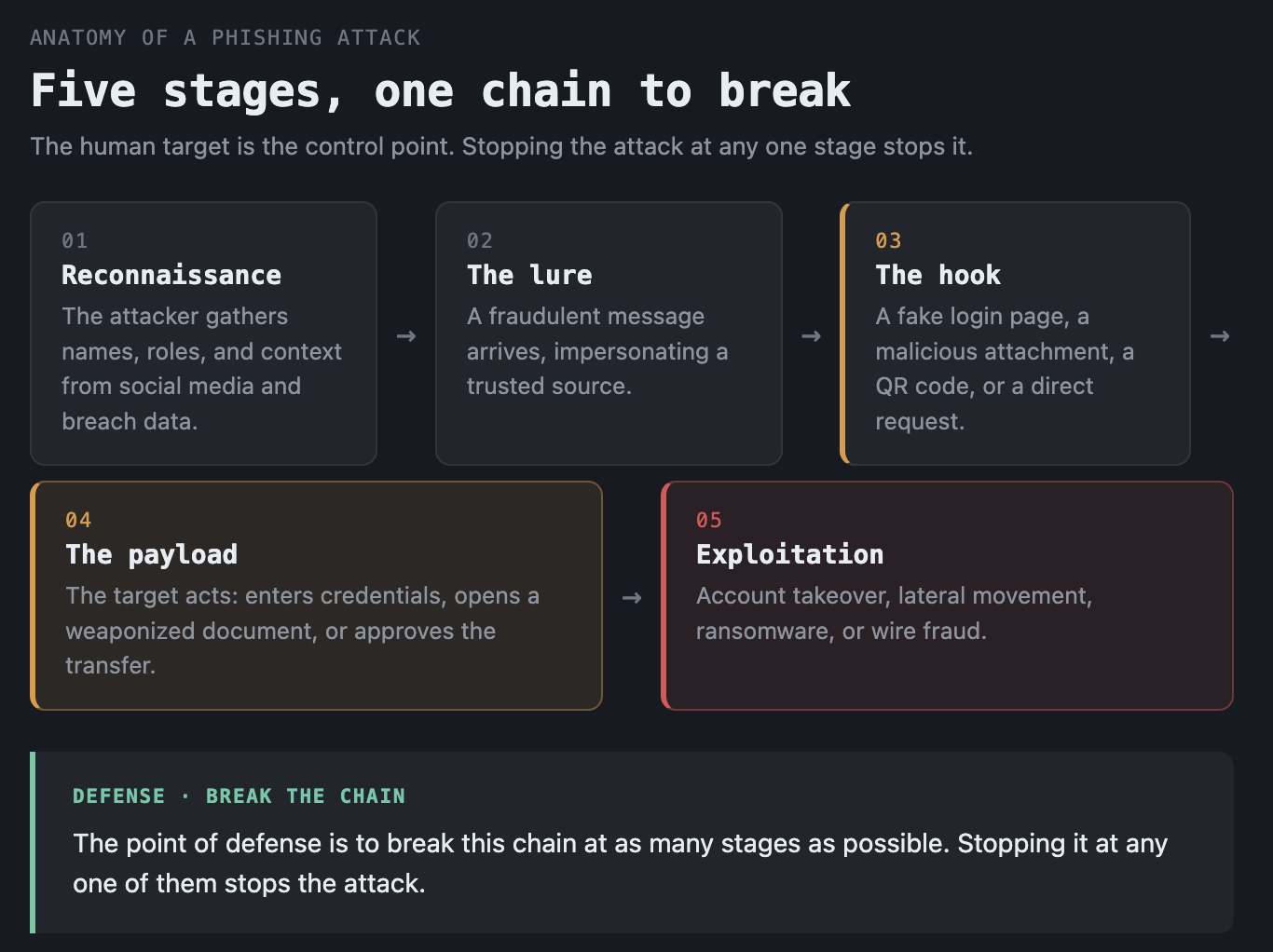
Most of these attacks move through the same stages, whether the channel is email, phone, or text.
- Reconnaissance. The attacker gathers names, roles, email addresses, and context from social media, breach data, and company websites. For targeted attacks this is where the message gets its credibility.
- The lure. The fraudulent message arrives, impersonating a trusted source and carrying one of the psychological levers above.
- The hook. A link to a fake login page, a malicious attachment, a QR code, or a direct request such as "wire this payment" or "reset my MFA."
- The payload. The target acts. They enter credentials into a harvesting page, open a weaponized document that runs malware, or approve the fraudulent transfer.
- Exploitation. The attacker uses what they got: logging into the account, taking over the mailbox, moving laterally, or cashing out the fraud. From here phishing becomes account takeover, ransomware, or wire fraud.
The whole point of defense is to break this chain at as many stages as possible, because stopping it at any one of them stops the attack.
Types of phishing
It is a family of techniques, separated by channel and by how targeted they are.
| Type | Channel | Who it targets | Primary goal |
|---|---|---|---|
| Email phishing | Email, mass-sent | Anyone | Credentials or malware at scale |
| Spear phishing | Email, tailored | A specific person or team | Targeted credential or access theft |
| Whaling | Executives and senior leaders | High-value approvals and fraud | |
| Business Email Compromise (BEC) | Email, often a hijacked account | Finance staff and employees | Fraudulent wire transfers and data |
| Vishing | Phone or voicemail | Employees, help desks | Credentials, MFA resets, payments |
| Smishing | SMS or messaging apps | Mobile users | Credential pages, malicious apps |
| Quishing | QR code | Mobile users | Credential harvesting off-device |
| Clone phishing | Anyone | Swap a real attachment or link for a malicious copy | |
| Angler phishing | Social media | Brand customers | Fake support accounts harvesting logins |
A few matter more than their row suggests.
Spear phishing is the targeted version, written for one person or one organization using real details. It is the technique behind most serious intrusions, including those run by an advanced persistent threat, because the tailoring makes it far harder to spot.
Business Email Compromise is the most expensive category by a wide margin. BEC skips malware entirely: the attacker compromises or impersonates a trusted email account and asks for a payment, an invoice change, or sensitive data. The FBI's Internet Crime Complaint Center reported roughly $3 billion in BEC losses in 2025 alone. It works because it lands inside a real financial workflow and looks like ordinary business.
Vishing and smishing move phishing off email, where users are more trusting and security tooling is thinner. The MGM intrusion was vishing. The rise of these channels is why phone and text are now a primary attack surface, not an afterthought.
Quishing hides the malicious link inside a QR code, which moves the victim to a personal phone that is often outside corporate filtering and harder to inspect. It is a direct response to better email-link scanning.
Phishing techniques and red flags
Underneath the types, attackers reuse a consistent toolkit. Knowing it is how a defender, or a user, spots the attempt.
- Sender spoofing and lookalike domains. A forged display name, or a domain like
micros0ft-support.comthat reads as legitimate at a glance. Domains registered minutes before the campaign are a strong signal. - URL obfuscation. Link text that hides the real destination, URL shorteners, homoglyph characters, and credential-harvesting pages that clone a real login screen pixel for pixel.
- Malicious attachments. Documents with macros, scripts, or links that fetch a payload. Increasingly these are HTML files or archives that evade simple scanning.
- Adversary-in-the-middle (AiTM) kits. This is the technique blue teams most need to understand now. A reverse-proxy phishing kit such as Evilginx sits between the victim and the real site, relays the login, and captures the resulting session token. Because it steals the authenticated session rather than just the password, it defeats most one-time-code and push-based MFA. Only phishing-resistant MFA stops it.
- QR codes and voice. Moving the interaction to a channel with weaker controls, as covered above.
The common thread for users: urgency plus an unexpected request for credentials, money, or an MFA approval is the pattern to distrust, regardless of how legitimate the message looks.
How phishing fits the attack chain
Phishing is rarely the goal. It is the delivery stage, the way an attacker gets the first foothold or the first credential, after which the real objective begins.
A harvested password becomes an account takeover. An account takeover becomes lateral movement, mailbox rules that hide the intrusion, and a launch point for the next wave from a now-trusted internal address. A weaponized attachment becomes a malware foothold that leads to ransomware. A convincing request becomes a wire transfer that never comes back. The 62% human-element figure in the DBIR reflects this: phishing is the most common opening move, and a large fraction of major breaches trace back to one person acting on one message.
This is why defending against it is not just an email problem. It is the first link in chains that end in a full cyberattack, extortion, and fraud, and breaking it early is far cheaper than cleaning up what follows.
How to defend against phishing
No single control stops phishing, because it spans technology, people, and process. Effective defense layers all three.
Technical controls.
- Authenticate email. Deploy SPF, DKIM, and DMARC so spoofed messages claiming your domain are rejected. This is the baseline that blocks a large class of impersonation.
- Filter at the gateway. A secure email security gateway scans links and attachments, detonates suspicious files in a sandbox, and quarantines known-bad mail before it reaches an inbox.
- Use phishing-resistant MFA. FIDO2 security keys and passkeys defeat AiTM kits because the credential is bound to the legitimate site and cannot be relayed. One-time codes and push approvals are better than nothing but do not stop session-token theft.
- Filter DNS and web traffic. Block known malicious and newly registered domains at the network layer so a click does not reach the harvesting page.
Human controls.
- Train and simulate. Regular, realistic simulations build recognition, as long as the goal is learning rather than punishment.
- Make reporting easy and blameless. A one-click report button turns every employee into a sensor. The fastest way a SOC learns about a live campaign is a user who reports it.
Process controls.
- Verify money and identity out of band. Any payment change or credential reset request should be confirmed through a separate, known channel. A callback to a known number would have stopped both BEC fraud and the MGM help-desk reset.
- Limit blast radius. Least-privilege access and segmentation mean a single compromised account reaches less.
How a SOC handles a reported phish
This is the part vendor explainers skip, and it is the day-to-day reality for a blue teamer. When a suspicious email is reported, the response follows a repeatable loop.
- Triage. Confirm whether the message is malicious. Read the full headers to check the true sender and the delivery path, and examine the links and attachments without clicking them.
- Extract indicators. Pull the sender address, the originating IP, the URLs, and any file hashes. These become the indicators of compromise used for the next steps.
- Detonate safely. Open the link or attachment in an isolated sandbox to see what it actually does: where the credential page posts to, what a document downloads.
- Scope it. Search the mail platform for every other copy of the message. One report usually means dozens of deliveries. Find everyone who received it and, critically, anyone who clicked or entered credentials.
- Contain and remediate. Purge the message from all mailboxes, block the indicators at the gateway and firewall, reset credentials for anyone who fell for it, and revoke active sessions to kill any stolen tokens.
- Hunt and improve. Check for the follow-on activity an attacker would attempt: new inbox forwarding rules, logins from unusual locations, MFA changes. Then feed the indicators into SIEM detections so the next instance is caught automatically, and use them to seed proactive threat hunting across the environment.
When a click leads to a confirmed account takeover, this rolls into full incident response. The skill that matters most here is not running the tools, it is reading a raw email header and a suspicious URL and telling a real attack from a noisy newsletter.
Getting started with phishing analysis
If you are building the skill, the work is in the artifacts.
- Read email headers. Learn the path a message takes and how to spot a forged sender, a failed DMARC check, or a suspicious originating server.
- Analyze URLs and attachments safely. Practice extracting and inspecting links and files in an isolated environment, and learn what a credential-harvesting page and a malicious macro actually look like.
- Trace a phishing-driven intrusion. Follow a real case from the delivered email through the click, the credential theft, and the account takeover, so you see the whole chain rather than just the lure.
- Write detections. Turn the indicators from a phishing case into SIEM rules and hunting queries.
The bottom line
Phishing is the attack that targets people instead of systems, and that is exactly why it remains the most common way breaches begin. It is cheap, it scales, and it walks past technical defenses by convincing someone to open the door, whether through a mass email, a tailored spear-phishing message, a fraudulent payment request, or a phone call to a help desk like the one that cost MGM $100 million.
Defending against it means layering technology, training, and process so the chain breaks early, and it means having a SOC that can triage a reported phish fast and scope it before a click becomes a breach. The constraint, as always, is the analyst who can read a header and a URL and tell an attack from noise. If you want to build that, work real cases.
Frequently asked questions
Yes. Adversary-in-the-middle phishing kits relay your login to the real site and steal the resulting session token, which bypasses one-time codes and push approvals. Phishing-resistant MFA, such as FIDO2 security keys and passkeys, stops this because the credential is tied to the legitimate site and cannot be relayed.
Disconnect from anything you entered, change the password for the affected account immediately, and enable or reset MFA. Report it to your security team right away so they can scope the campaign, revoke active sessions, and check for follow-on activity such as new mailbox forwarding rules. Speed limits the damage.
Start by learning to read email headers and to safely inspect URLs and attachments in an isolated environment. Then work real phishing and intrusion cases in hands-on labs, tracing an attack from the lure through credential theft to account takeover, to build the triage and detection skills SOC roles test for.
Phishing is a scam in which an attacker sends a fake message, usually email but also text or phone, pretending to be someone you trust to trick you into giving up a password, money, or access. It targets the person rather than the technology, which is why it is so common and why no single tool fully stops it.
The main types are email phishing (mass-sent), spear phishing (targeted at a specific person), whaling (aimed at executives), business email compromise (fraudulent payment requests from a trusted account), vishing (voice), smishing (SMS), and quishing (QR code). They differ by channel and by how tailored the message is.
Phishing usually refers to mass, untargeted messages sent to many people at once. Spear phishing is targeted: the attacker researches a specific person or organization and crafts a message using real details, which makes it far more convincing and much harder to detect. Spear phishing is behind most serious, targeted intrusions.