What Is Threat Hunting? Methodologies, Steps & Tools
No alert fired. The dashboards are green. A hunter starts anyway, with a hunch: an attacker who got in would try to run code in memory to dodge antivirus, and on Windows the easiest way is encoded PowerShell. So she queries process-creation logs for powershell.exe launched with an -EncodedCommand flag, then filters for any spawned by Outlook or Word. Three hosts come back. Two are a known admin script. The third is a finance workstation running a base64 blob that decodes to a download cradle pulling a payload from an IP registered last week. No rule caught it. A question did. That is threat hunting.
Threat hunting is the practice of proactively searching for threats that have already evaded your automated defenses. It starts from the assumption that prevention is imperfect and detection has gaps, so something may already be inside. Instead of waiting for an alert, a human forms a hypothesis about how an attacker would operate and goes looking through the data for evidence.
This guide covers what threat hunting is and is not, why dwell time makes it necessary, the three core methodologies, the hunting loop step by step, what to hunt using the Pyramid of Pain, the data and tools a hunter needs, the Hunting Maturity Model, and how to build the skill. It is written for blue teamers: SOC analysts, threat hunters, and DFIR practitioners who do the work.
What is threat hunting?
Threat hunting is human-led, hypothesis-driven, and proactive. Those three words carry the whole definition.
Human-led. Automated detection encodes what you already know is bad into rules and models. A hunter looks for what the rules do not yet catch. The premise, and it is worth stating plainly, is that the most capable detection engine is still a trained analyst who can reason about an adversary, not a signature.
Hypothesis-driven. A hunt starts with a specific, testable idea: "an attacker in our environment would do X, which would leave trace Y in data source Z." Without a hypothesis you are not hunting, you are browsing logs.
Proactive. Hunting runs before an alert, not after. It assumes compromise rather than waiting for proof of one. The mindset shift is the point: not "has anything tripped a wire?" but "if someone were already inside, how would I find them?"
A hunt has one of two honest outcomes. Either it finds malicious activity, which becomes an incident, or it finds nothing, which is not a wasted hunt. A clean hunt either confirms a gap is actually clean or, more often, exposes a visibility hole, a missing log source, or a weak detection that then gets fixed. Every hunt should leave detection better than it found it.
Why threat hunting matters
Attackers do not detonate the moment they get in. They dwell. Mandiant's M-Trends 2026 report put the global median dwell time, the gap between an intrusion starting and being discovered, at 14 days. When an outside party is the one to notify the victim, the median stretches to 25 days. That is the window threat hunting attacks: the stretch of time an intruder operates quietly while automated tools see nothing worth alerting on.
Automated detection has a structural blind spot. It is predictable by design. A rule fires on a known pattern, so a competent attacker tests against the same tools you run and builds techniques that slip under them: living-off-the-land binaries that look like admin work, fileless execution that leaves no file to scan, valid stolen credentials that generate no failed logins. None of that trips a signature. A hunter looking for the behavior, not the signature, can still catch it.
The payoff is not only the threats you find. Hunting hardens the whole detection program. Every hunt that uncovers a technique your tools missed becomes a new detection rule. Every hunt blocked by a missing log source justifies onboarding it. Hunting is how a SOC moves from reacting to what its tools already know to closing the gaps they do not.
Threat hunting vs. automated detection, IR, and threat intel
These four functions sit next to each other and blur constantly. The clean split:
| Function | Trigger | Driven by | Question it answers |
|---|---|---|---|
| Automated detection | A rule or model match | Known patterns | Did something known-bad just happen? |
| Threat hunting | A human hypothesis | Assumption of compromise | Is something bad here that we have not detected? |
| Incident response | A confirmed incident | A known compromise | How do we contain and recover from this? |
| Threat intelligence | External research | Adversary tracking | Who is attacking whom, and how? |
Threat hunting feeds and is fed by the other three. Threat intelligence supplies the adversary behaviors a hunter turns into hypotheses. A successful hunt that confirms a compromise hands off to incident response. And the output of every hunt loops back into automated detection as new rules. Hunting is the proactive layer that sits on top of a SIEM and the rest of the detection stack, not a replacement for any of it.
Threat hunting methodologies
Threat hunting starts from one of three sources. Most mature programs use all three.
| Methodology | Starting point | Example |
|---|---|---|
| Hypothesis-driven | A behavior or TTP, often from threat intel | "Are adversaries using encoded PowerShell here?" |
| Intel-based (IOC / IOA) | A known indicator | "Has this C2 domain been resolved by any host?" |
| Analytics-driven | A statistical anomaly | "Which host's outbound traffic deviates from its baseline?" |
Hypothesis-driven hunting. The hunter starts from an adversary behavior, usually a tactic, technique, or procedure (TTP) drawn from threat intelligence or a recent breach report, and asks whether it is present in the environment. This is the highest-value threat hunting because it targets how attackers operate, not just what they have used before.
Intel-based hunting (IOCs and IOAs). The hunter starts from a known indicator. Indicators of compromise (IOCs) are artifacts of a known attack: file hashes, malicious IPs, C2 domains. Indicators of attack (IOAs) describe the actions of an attack regardless of the tooling: credential dumping, lateral movement, persistence. IOCs answer "have we seen this exact thing," IOAs answer "is this kind of thing happening." IOAs are the more durable of the two, and the reason is the Pyramid of Pain below.
Analytics-driven hunting. Statistical analysis and machine learning surface anomalies, a host beaconing on a regular interval, a user account active at hours it never was, a process making network connections it never makes, and a human investigates the leads. The math finds the outlier. The hunter decides whether it is an attacker or a noisy backup job.
The threat hunting loop
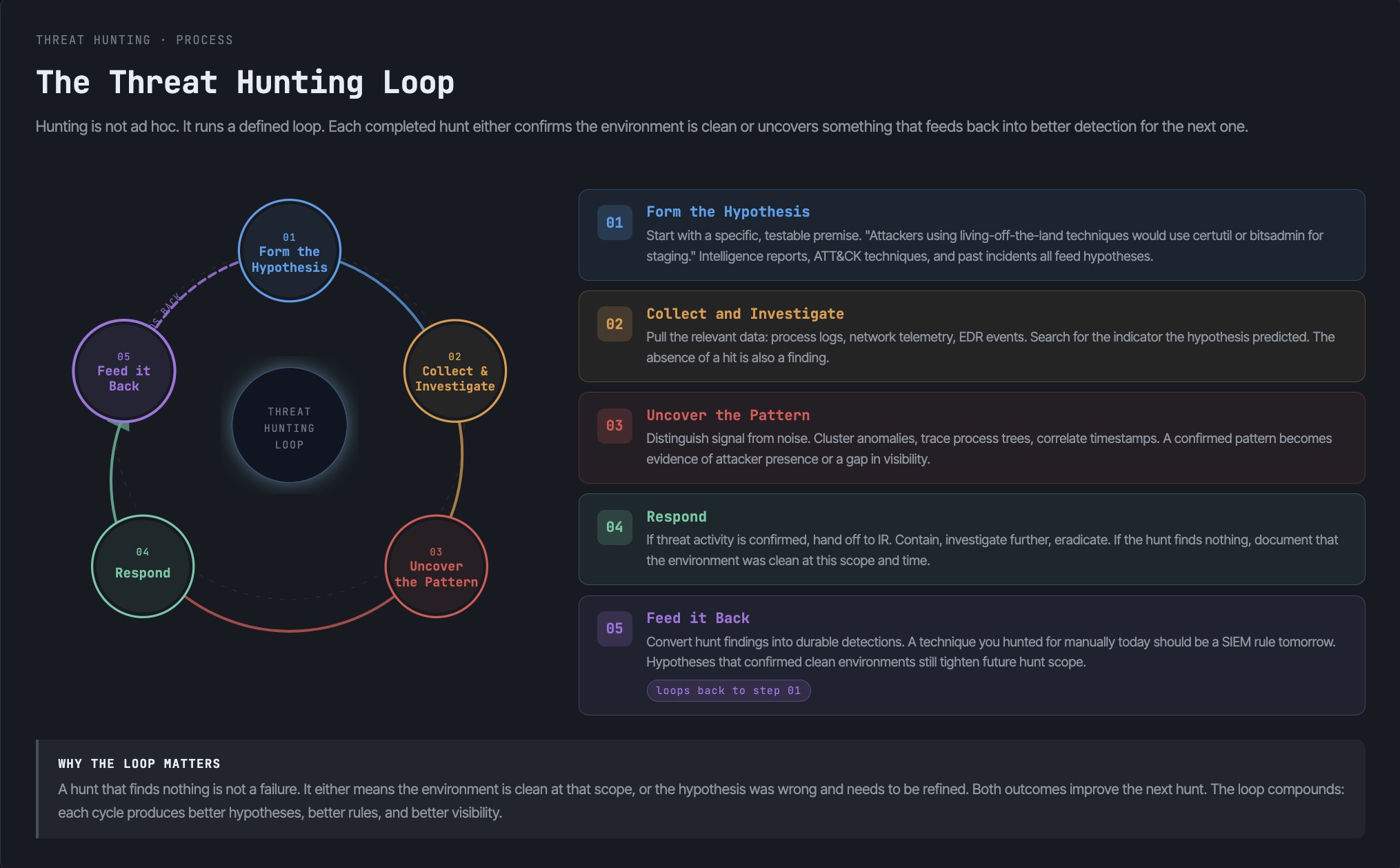
A hunt is a loop, not a one-shot search. Run it and the program gets better each turn.
1. Form the hypothesis
A strong hypothesis has three parts: a specific adversary behavior, the data source that would show it, and the indicator that would confirm it. Vague ideas ("look for malware") do not test. Specific ones do.
Behavior:    Malicious PowerShell execution via encoded commands (MITRE ATT&CK T1059.001)
Data source: Process-creation logs (Windows Event ID 4688 / Sysmon Event ID 1)
Indicator:   powershell.exe with -EncodedCommand, especially spawned by Office apps
Hypotheses come from threat intelligence, fresh breach reports, MITRE ATT&CK technique pages, and anomalies your tools flagged but never explained.
2. Collect and investigate the data
The hunter queries the relevant telemetry and works the results. The query is the easy half. Triaging what comes back, separating the admin script from the download cradle, is the work. This stage continues until the activity is explained, either as benign or as a confirmed compromise.
SEARCH process_creation
  WHERE process = "powershell.exe"
  AND command_line CONTAINS "-enc" OR "-EncodedCommand"
  AND parent_process IN ("winword.exe","excel.exe","outlook.exe")
3. Uncover the pattern
When something real surfaces, the hunter pivots to scope it: which hosts, which accounts, how it got in, what it touched, and whether it is still active. A single suspicious process becomes a full picture of the intrusion.
4. Respond
A confirmed hunt becomes an incident. The findings hand off to incident response to contain and remediate: isolate hosts, disable accounts, block indicators, preserve evidence. The hunt found it; IR cleans it up.
5. Feed it back
The last step is the one that compounds. Turn what you found into a durable automated detection so the next instance fires an alert without a hunt. Document the hypothesis, the query, and the result so the next hunter does not start from zero. A hunt that is not written down is a hunt you will run again.
What to hunt: the Pyramid of Pain
Not all indicators are worth the same effort. David Bianco's Pyramid of Pain, introduced in 2013, ranks indicator types by how much pain it causes an adversary when you detect and block them.
At the bottom sit hash values, IP addresses, and domain names. Trivial for an attacker to change. Block a hash and they recompile; block an IP and they move. Detecting these is easy and almost worthless, because it costs the adversary minutes.
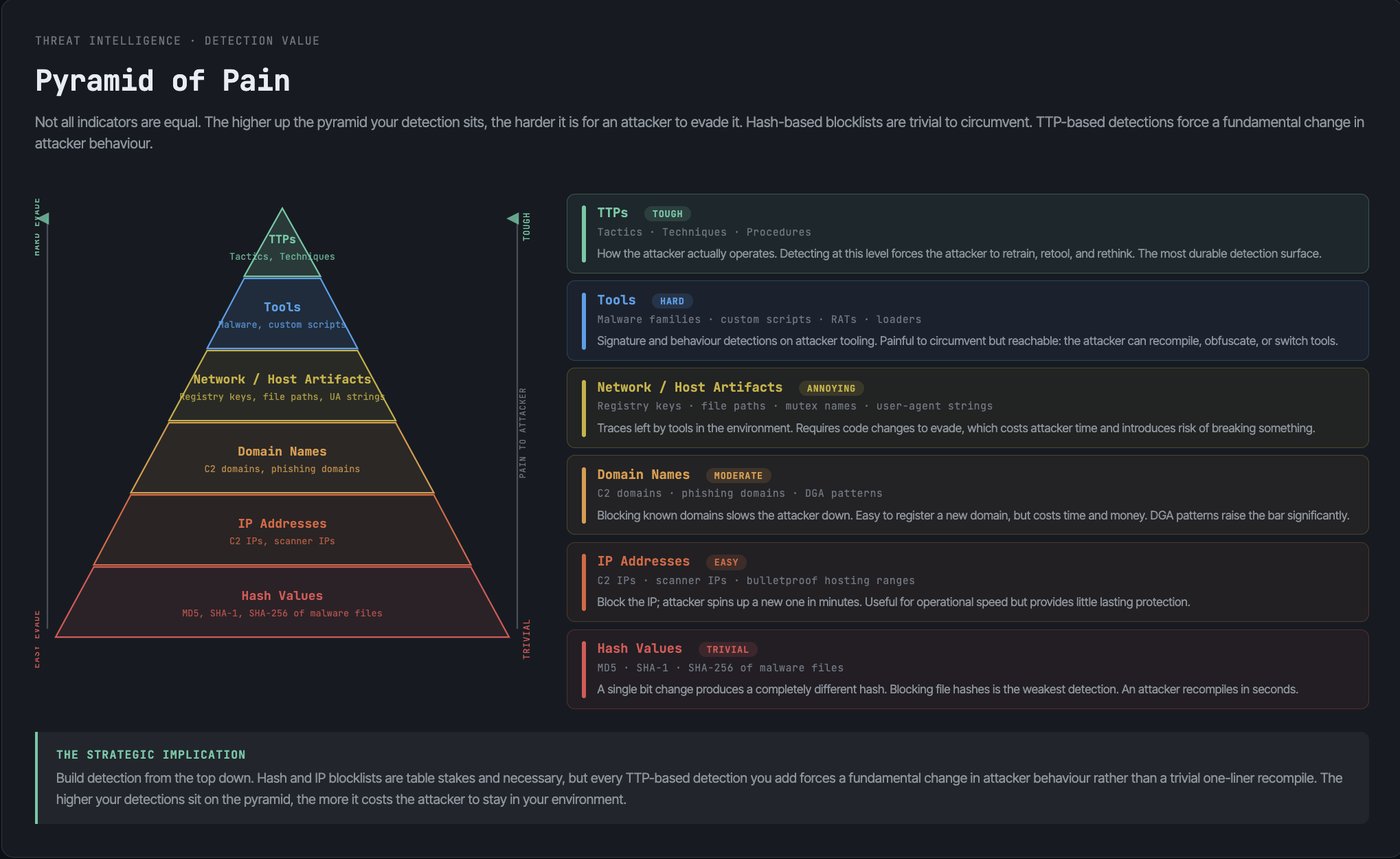
At the top sit tactics, techniques, and procedures: how the attacker actually operates. Forcing an adversary to change their TTPs, their whole approach to credential theft or lateral movement, is expensive and slow for them. That is where hunting pays off most.
The lesson drives hunt prioritization: hunt for behavior, not artifacts. A hunt for "this specific C2 IP" is dead the moment the attacker rotates infrastructure. A hunt for "service accounts requesting unusual Kerberos tickets," the behavior behind Kerberoasting, keeps working across campaigns because the technique is hard to change. Mapping threat hunting to MITRE ATT&CK techniques is how teams hunt at the painful top of the pyramid systematically.
Data and tools a threat hunter needs
Hunting runs on data. No telemetry, no hunt. The non-negotiable sources:
- Endpoint telemetry. Process creation with command lines, file and registry changes, module loads. EDR or Sysmon. This is where most hunts live.
- Network data. Connection logs, DNS queries, proxy and firewall logs. Beaconing and exfiltration show up here.
- Authentication and identity. Logon events, Kerberos tickets, directory changes. Lateral movement and credential abuse live in this data.
- Cloud and SaaS audit logs. API calls, control-plane changes, identity events from AWS, Azure, and M365.
The tools that turn that data into hunts:
| Tool | Role in hunting |
|---|---|
| SIEM | Central search across all log sources; where most hunts are queried |
| EDR / XDR | Deep endpoint telemetry and the ability to pivot and respond |
| Threat intelligence platform | Supplies the TTPs and indicators that seed hypotheses |
| Analytics / UEBA | Surfaces statistical anomalies as hunting leads |
| MITRE ATT&CK | The framework that organizes hunts around real techniques |
The hard requirement behind all of it is data retention. An attacker who dwelled for weeks is invisible if your logs only go back days. Hunting needs enough history to look backward across the dwell window, which is exactly why log retention and cost are a hunting concern, not just a compliance one.
Threat hunting maturity: the HMM
Not every organization hunts at the same level, and pretending otherwise wastes money. David Bianco's Hunting Maturity Model (HMM), developed at Sqrrl, describes five levels from HMM0 to HMM4, measured by data quality and how routine and automated threat hunting has become.
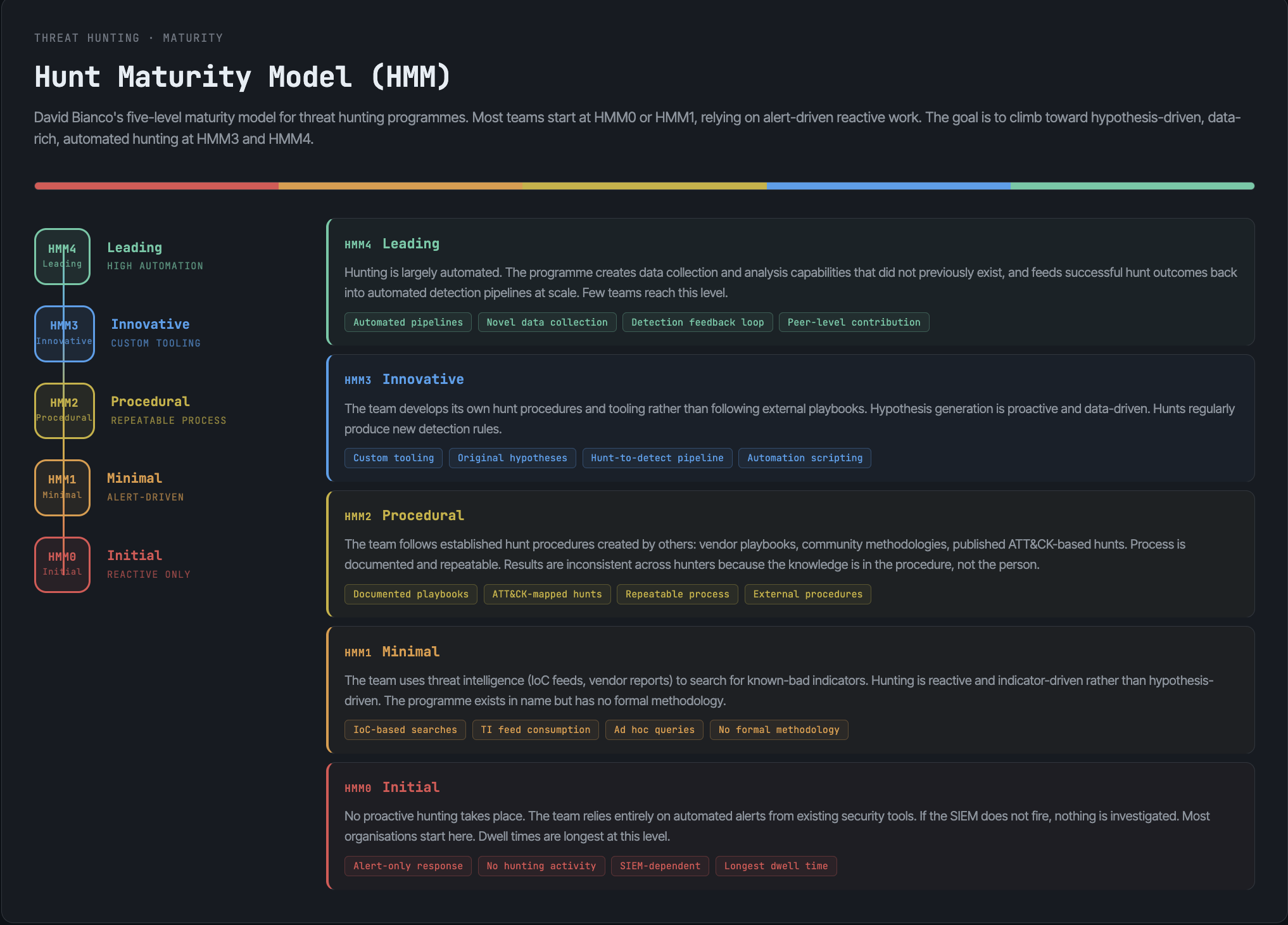
- HMM0 (Initial). Relies entirely on automated alerting. No real hunting. Little data collected.
- HMM1 (Minimal). Pulls in threat intelligence indicators and searches for them. Some data collection.
- HMM2 (Procedural). Follows hunting procedures others have built. Good, broad data collection. Where most capable SOCs sit.
- HMM3 (Innovative). Creates its own hypotheses and hunting procedures. Skilled hunters, strong data.
- HMM4 (Leading). Automates its successful hunts into detections, freeing hunters to create new ones. The compounding loop runs on its own.
The model is a roadmap, not a scoreboard. The honest goal for most teams is HMM2 to HMM3: hunting routinely against good data, writing original hypotheses, and feeding wins back into automation. HMM4 is where the feedback loop becomes the operating model.
Building a threat hunting capability
A threat hunting capability rests on three things, and a tool buys you only one of them.
People. Threat hunting needs analysts who understand attacker tradecraft well enough to imagine it and the data well enough to find it. This is the binding constraint. There is a real skills shortage in hunting, and experienced hunters are expensive and hard to retain. No platform substitutes for the judgment.
Data. Granular, retained telemetry across endpoint, network, identity, and cloud, with enough history to look back across a dwell window. Thin or short-lived data caps how deep any hunt can go.
Threat intelligence. Current adversary behaviors to turn into hypotheses, and the context to interpret what a hunt surfaces. Hunting without intel is hunting blind.
This is why many organizations buy managed threat hunting rather than build it. A managed service brings hunters, scale, and cross-customer visibility you cannot replicate alone, at a lower cost than hiring a full team. The trade-off is the familiar one: an external team starts without deep knowledge of your environment, and you give up some control. The common middle path is co-managed: your team owns environment context and the response, the provider supplies hunting depth and coverage.
Whichever model you choose, the work is the same: form good hypotheses, hunt them against good data, and turn what you find into detection.
Getting started with threat hunting
If you are building the skill, the path is hands-on, not theoretical.
- Learn the data first. You cannot hunt in logs you do not understand. Know what normal looks like in process-creation, authentication, and network data before you go looking for abnormal.
- Start hypothesis-driven and small. Pick one MITRE ATT&CK technique relevant to your environment. Write the three-part hypothesis. Hunt it. Document it.
- Hunt the top of the pyramid. Favor behavior over artifacts. A TTP hunt outlives the indicator hunt.
- Write everything down. The query, the data source, the result. A documented hunt becomes a repeatable procedure and, eventually, an automated detection.
- Close the loop. Every hunt either becomes a detection or exposes a visibility gap to fix. That is how the program matures.
Frequently asked questions
Threat hunting is proactively searching your environment for attackers that have already slipped past automated defenses. Instead of waiting for an alert, a human analyst forms a hypothesis about how an intruder would behave and looks through the data for evidence of it.
Automated threat detection fires alerts on known-bad patterns it has been told to look for. Threat hunting proactively searches for malicious activity that no rule has caught yet, driven by a human hypothesis rather than a signature. Hunting finds the gaps; detection then automates closing them.
The three methodologies are hypothesis-driven hunting (starting from an adversary behavior or TTP), intel-based hunting (starting from a known IOC or IOA), and analytics-driven hunting (investigating statistical anomalies surfaced by analytics or machine learning). Mature programs use all three.
The threat hunting loop runs in five stages: form a testable hypothesis, collect and investigate the relevant data, uncover and scope any real pattern, respond by handing confirmed findings to incident response, and feed the result back into automated detection. The loop repeats and improves each time.
Threat hunters rely on a SIEM for cross-source search, EDR or XDR for deep endpoint telemetry, threat intelligence platforms to seed hypotheses, analytics or UEBA to surface anomalies, and the MITRE ATT&CK framework to organize hunts around real techniques. Retained, granular log data underpins all of them.
Yes. A SIEM and EDR generate alerts on patterns they already recognize, but skilled attackers build techniques specifically to avoid those patterns. Threat hunting is the proactive layer that looks for what those tools miss, and it turns each finding into a new detection your SIEM and EDR can then automate.