What Is Malware? Types, How It Works, and Defense
A user clicks a "résumé.pdf.exe" attachment. Nothing visible happens. No crash, no popup, no ransom note. Behind the screen, the file copies itself to %AppData%, reads the Chrome login database and the browser's session cookies, and posts them to a server in 40 seconds. The attacker now has the user's saved passwords and live session tokens, which means they can replay an authenticated session and walk past multi-factor authentication without ever knowing the password. That is an infostealer, and it is one of the most common malware infections a SOC sees in 2026. It is quiet by design, because its entire value depends on the victim not noticing.
Malware is any software or code written to do harm: steal data, encrypt files for ransom, hand an attacker remote control, spy on a user, or destroy systems outright. The word is a contraction of "malicious software," and it is an umbrella term, not a single thing. Ransomware, trojans, worms, spyware, rootkits, and infostealers are all malware. What unites them is intent and unauthorized action, not a shared technique.
This guide covers what malware is and what separates it from a legitimate program, the main types and what each one does, how an infection actually unfolds from delivery to action, how malware spreads, how defenders detect and remove it, and the controls that stop it. It is written for blue teamers: SOC analysts, incident responders, and anyone who has to recognize a malicious file and decide what it means.
What is malware?
Malware is code created to act against the interests of the system's owner. The definition rests on two things: intent and authorization. A disk-wiping utility you run on purpose is a tool. The same wiping behavior triggered on your domain controller by an attacker is a wiper. The code can be identical. What makes it malware is that it runs without consent and serves someone else's goal.
That framing matters operationally, because it explains why detection is hard. Much of what malware does, such as compressing files, opening network connections, reading the registry, or scheduling a task, is also what normal software does. A backup agent encrypts files. An IT tool runs remote commands. The malicious version uses the same APIs. Defenders cannot just blocklist "encrypts files"; they have to separate authorized behavior from unauthorized behavior, and that is the entire problem.
Two distinctions clear up common confusion:
- Malware vs. exploit. An exploit is a technique that abuses a vulnerability to gain code execution. Malware is the payload that runs once execution is achieved. The exploit gets the attacker in the door; the malware is what they brought with them. The two often arrive together but are not the same thing.
- Malware vs. a potentially unwanted program (PUP). Aggressive adware and bundled toolbars are unwanted but sit in a gray zone. They degrade the system and annoy the user without the clear hostile intent of true malware. Many vendors track them separately.
The scale is the reason this is a permanent problem and not a solved one. The AV-TEST Institute, an independent body that counts new samples, registers over 450,000 new malicious programs and potentially unwanted applications every single day, and its running total has passed 1.5 billion unique samples. No human reviews those by hand. That volume is why detection leans on automation, behavior, and pattern matching rather than a list of known-bad files.
The main types of malware
Malware is classified two ways at once, and they are easy to conflate. One axis is how it propagates: a virus needs a host file and a user action to spread, a worm spreads itself across a network with no help. The other axis is what it does once it runs: steal, encrypt, spy, destroy, or grant control. Most real-world samples combine several of these. A single intrusion often involves a loader that pulls down an infostealer that later drops ransomware.
| Type | What it does | Primary goal |
|---|---|---|
| Ransomware | Encrypts files or whole systems, demands payment, often steals data first for double extortion | Extortion |
| Infostealer | Silently harvests credentials, session cookies, crypto wallets, and system data | Credential theft |
| Trojan | Poses as legitimate software to get the user to run it; opens the door for other payloads | Initial access |
| Worm | Self-replicates and spreads across networks with no user action | Propagation |
| Virus | Attaches to a file or program and spreads when that host is run | Propagation |
| Rootkit | Hides deep in the OS (or below it) to conceal other malware and maintain stealthy control | Stealth, persistence |
| Spyware / keylogger | Records activity, keystrokes, and screens; reports back to the operator | Surveillance |
| Botnet agent | Enrolls the host into a network of bots controlled for DDoS, spam, or mining | Remote control at scale |
| Loader / dropper | A small first-stage payload whose only job is to fetch and run the real malware | Staging |
| RAT (remote access trojan) | Gives the attacker hands-on-keyboard remote control of the host | Remote control |
| Cryptominer | Hijacks CPU/GPU to mine cryptocurrency for the attacker | Resource theft |
| Wiper | Destroys or corrupts data with no recovery path; ransom is often a cover story | Destruction |
| Fileless malware | Runs in memory using trusted system tools, leaving little on disk | Evasion |
Ransomware
Ransomware encrypts a victim's files and demands payment for the decryption key. Modern operators run it as a business: they breach the network, steal sensitive data first, then encrypt, so even a victim with good backups faces the threat of leaked data. That is double extortion, and it is now the default. Ransomware is delivered by an affiliate model (ransomware-as-a-service), where one group builds the malware and others rent it to run intrusions. It is the most financially damaging malware category for organizations.
Infostealers
Infostealers are the commodity threat of the moment. They grab saved browser passwords, autofill data, session cookies, cryptocurrency wallets, and system details, package them into a "log," and exfiltrate it in seconds. The stolen session cookies are the dangerous part: a valid cookie lets an attacker resume an authenticated session and bypass MFA entirely. Those logs are then sold in bulk on criminal markets, where access brokers turn them into the initial access that ransomware crews buy. An infostealer infection on one laptop can become a full network breach two weeks later.
Trojans, RATs, loaders, and droppers
These four overlap and describe the staging of an intrusion. A trojan is malware disguised as something the user wants, which is the social-engineering wrapper that gets it run. A dropper or loader is a small first stage whose only job is to pull down and execute the real payload, often entirely in memory to dodge disk-based detection. A RAT (remote access trojan) gives the operator interactive control: run commands, move files, pivot. In practice a chain looks like phishing email → trojan document → loader → RAT or infostealer. Naming any one of them in isolation misses that they are links in the same chain.
Worms and viruses
The original categories, and the source of the word "virus" as a synonym for all malware, which it is not. A virus attaches to a host file or program and spreads when a user runs that host. A worm needs no host and no user: it exploits a vulnerability or weak credential to copy itself machine to machine on its own. That self-propagation is why worms cause the fastest, widest outbreaks. The distinction still matters in an incident, because a worm changes the containment problem from "clean this host" to "stop the spread now."
Rootkits, spyware, botnets, cryptominers, and wipers
The rest of the field, grouped by goal. A rootkit hides other malware and maintains control by burying itself in the operating system, sometimes below it in the bootloader or firmware, which makes it hard to detect and harder to remove. Spyware and keyloggers watch and record. A botnet agent enrolls the host into a controlled fleet used for distributed denial-of-service, spam, or fraud. A cryptominer quietly steals compute to mine cryptocurrency, trading stealth for a steady payout. A wiper destroys data outright, and has been used in sabotage and in state-aligned attacks where the goal is damage, not money. Some wipers pose as ransomware to disguise the intent.
How a malware infection works
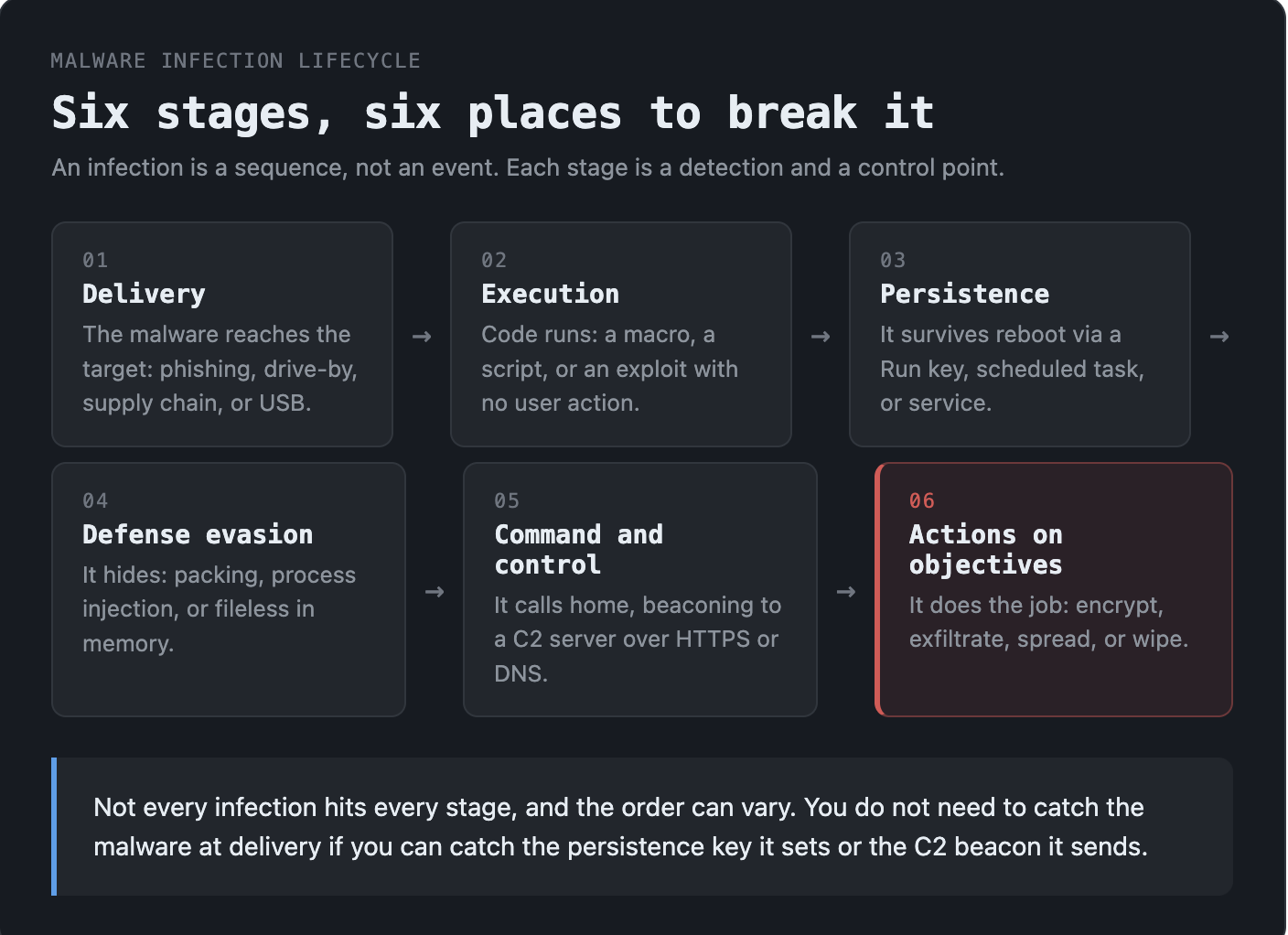
A malware infection is not a single event. It is a sequence, and mapping it to that sequence is how defenders find the place to break it. The stages line up closely with the MITRE ATT&CK framework's tactics and with the cyber kill chain.
- Delivery. The malware reaches the target: a phishing email with a malicious attachment or link, a compromised or malicious website (drive-by download), poisoned search ads (malvertising), a trojanized software download, an infected USB drive, or a software supply-chain compromise.
- Execution. Code runs. A user opens the attachment and enables macros, a script executes, or an exploit triggers execution through a vulnerability with no user action at all.
- Persistence. The malware ensures it survives a reboot, typically by setting a registry Run key, creating a scheduled task, installing a service, or modifying a startup folder. These persistence artifacts are some of the most reliable things a defender can hunt for.
- Defense evasion. It hides: packing or encrypting its own code, injecting into a legitimate process, disabling security tools, or running fileless in memory through PowerShell or other trusted binaries so there is little on disk to scan.
- Command and control. It calls home. The infected host beacons to a command-and-control (C2) server to receive instructions and report in, often over HTTPS or DNS to blend with normal traffic.
- Actions on objectives. It does the thing it was built for: encrypt files, exfiltrate the credential log, spread to the next host, or wipe the disk.
Not every infection hits every stage, and the order can vary. But the model is useful because each stage is a detection and a control point. You do not need to catch the malware at delivery if you can catch the persistence key it sets or the C2 beacon it sends.
How malware spreads
The delivery stage deserves its own look, because the vector is usually where defense is cheapest. The common ones:
- Phishing and malspam. Still the number one delivery method. A malicious attachment or a link to a credential-harvesting or malware-hosting page. Targeted versions (spear phishing) tailor the lure to the recipient.
- Drive-by downloads and malvertising. A compromised or malicious site runs an exploit against the browser, or a poisoned ad redirects to a fake download. The user may only have to visit the page.
- Software supply chain. The attacker compromises a legitimate software vendor or a code dependency, so the malware ships inside a trusted, signed update. This is the hardest to defend against because the delivery channel is one the victim already trusts.
- Exploiting exposed services. Worms and automated attacks scan for unpatched internet-facing services or weak/default credentials and self-propagate through them.
- Removable media. USB drives, still effective in air-gapped and operational-technology environments.
- Trojanized downloads and fake apps. Cracked software, fake installers, and malicious apps in or outside official app stores.
How to detect and remove malware
Signs of an infection
User-visible symptoms are unreliable now, because the most damaging malware is built to be silent. Still, watch for performance drops and overheating (often a cryptominer), unexpected pop-ups or browser redirects (adware), settings that change on their own, security tools that get disabled, programs that crash, and unexplained outbound network traffic. Absence of symptoms proves nothing: a well-built infostealer or RAT shows none.
How defenders detect it
Detection has moved from matching known files to watching behavior, because signatures cannot keep up with the daily flood of new samples.
- Signature and reputation. Antivirus matches a file's hash or pattern against known-bad. Fast and cheap, but blind to anything new or repacked.
- Behavioral and heuristic detection. Flags actions rather than files: a Word process spawning PowerShell, a binary setting a Run key and beaconing out. This is what catches novel and fileless malware.
- Endpoint detection and response (EDR). Records process, file, registry, and network activity on every endpoint and lets analysts hunt and respond. The standard tool for modern malware.
- Network detection. Spotting C2 beacons, suspicious DNS, and data exfiltration in network traffic.
- Indicators of compromise (IOCs). File hashes, IPs, domains, and registry keys, hunted across the environment to find every infected host, not just the first.
- Malware analysis. Taking a captured sample apart, statically and in a sandbox, to extract the IOCs and behaviors that feed every detection above.
Removing it
For a single commodity infection, EDR or antivirus can often quarantine and remove the file. For anything serious, removal is an incident response problem, not a cleanup task:
- Isolate the host from the network to stop spread and C2.
- Identify scope: which hosts, which accounts, what data, using the IOCs.
- Eradicate: remove persistence, kill the malware, and for anything with deep system access (rootkit) or unknown scope, reimage rather than trust a clean.
- Recover from known-good backups and reset any credentials the malware could have touched, because a stolen password survives the reimage.
The credential point is the one teams miss. Reimaging a laptop hit by an infostealer does nothing about the passwords and session tokens already exfiltrated. Those have to be rotated.
How to defend against malware
No single control stops malware. Defense is layered so that what gets past one layer is caught by the next.
- Patch and reduce exposure. Most worms and many intrusions ride known, unpatched vulnerabilities. Patch internet-facing systems first, and close exposed services.
- Multi-factor authentication (MFA). Blunts credential theft, with the caveat that infostealers targeting session cookies can bypass it. Pair MFA with short session lifetimes and phishing-resistant factors.
- Least privilege. Users without local admin limit what malware can install and how deep a rootkit can bury itself.
- EDR on every endpoint. The single highest-value control for catching and containing modern malware.
- Email and web filtering. Cut delivery at the most common vector.
- Network segmentation. Contain spread so one infected host is not the whole network.
- Backups, tested and offline. The real answer to ransomware. Backups an attacker cannot reach or encrypt, and that you have actually restored from in a drill.
- User awareness. People are the delivery target. Training that teaches them to recognize and report lures reduces the click rate that everything else depends on.
The pattern across all of these: assume something will get in, and build so that it is detected and contained fast rather than betting everything on prevention.
Why malware matters for blue teams
Malware is the payload behind most of what a security team responds to. A ransomware case, a data breach, a botnet takedown, a nation-state intrusion: at the center of each is a piece of malware doing the work. Understanding it is not optional for a defender.
- In the SOC, recognizing malware behavior in alerts is the difference between a closed false positive and a caught intrusion.
- In incident response, identifying the malware tells you scope and impact: what it did, what it touched, what to rotate and rebuild.
- In threat hunting, the behaviors and indicators malware leaves become the hypotheses you hunt across historical data.
- In detection engineering, analyzed malware turns into the YARA and Sigma rules that catch the next variant.
The bottom line
Malware is the code behind the incident: any program built to steal, encrypt, spy, control, or destroy without permission. It comes in many forms, from ransomware and infostealers to worms and wipers, but they share a shape: get delivered, execute, persist, hide, call home, and act. That shape is also the defender's map, because every stage is a place to detect and break the chain.
The volume of new malware means no blocklist keeps up, so modern defense watches behavior, layers controls, and assumes something gets in. For a blue teamer, the core skill is reading a malicious file and turning it into a detection that catches the next one. If you want to build that, work real samples against real intrusions.
Frequently asked questions
Possible signs include slowness or overheating, unexpected pop-ups or browser redirects, settings changing on their own, security software being disabled, and unexplained network traffic. But the most damaging malware, like infostealers and RATs, is built to show no symptoms at all, so the reliable way to detect it is endpoint detection and response (EDR) and behavioral monitoring, not waiting for visible signs.
Yes. Infostealers that grab a browser's active session cookies let an attacker replay an already-authenticated session, which sidesteps the MFA prompt because the login already happened. This is why MFA, while essential, is not sufficient on its own, and why rotating credentials and session tokens after an infostealer infection matters as much as reimaging the device.
For a single commodity infection, EDR or antivirus can quarantine and delete the file. For anything serious, treat removal as incident response: isolate the host, scope the infection using indicators of compromise, remove persistence (or reimage if a rootkit or unknown access is involved), restore from clean backups, and rotate any credentials the malware could have stolen. Reimaging alone does not undo data or passwords already exfiltrated.
Malware is any software or code written to harm a computer, network, or user, or to act without the owner's permission. It is short for "malicious software" and covers many types, including ransomware, viruses, worms, trojans, spyware, and infostealers. What makes something malware is hostile intent and unauthorized action, not the specific technique it uses.
The types seen most often today are ransomware (encrypts files for extortion), infostealers (silently steal credentials and session cookies), trojans (disguised malware that opens the door for other payloads), worms (self-spreading), and RATs (give an attacker remote control). Most real intrusions chain several of these together rather than using just one.
No. A virus is one type of malware: code that attaches to a file or program and spreads when that host runs. "Virus" is often used loosely to mean any malware, but most modern threats, such as worms, ransomware, and infostealers, are not technically viruses. Malware is the umbrella term; a virus is one category under it.