What Is Malware Analysis? Types, Stages, and Tools
A flagged executable lands in the analyst's queue: invoice_8842.exe, pulled off a finance workstation after the EDR raised a low-confidence alert. She does not run it. First she hashes it and checks the hash against VirusTotal: 3 of 72 engines flag it, all with generic names. Not conclusive. She opens it in PEStudio and pulls the strings: a hardcoded IP, a registry Run key path, and the import WinHttpConnect. Now she has a hypothesis. She copies the file to an isolated virtual machine with no route to the production network, detonates it, and watches. Within seconds the process writes a copy of itself to %AppData%, sets that Run key for persistence, and beacons to the hardcoded IP every 60 seconds. She captures the IP, the file hash, the mutex name, and the registry key. Those four artifacts become detection rules by end of day. That is malware analysis.
Malware analysis is the process of examining a malicious file or piece of code to determine what it does, how it works, where it came from, and how to detect and contain it. It combines tooling and human judgment, and it produces something concrete: indicators to block, behaviors to detect, and a clear answer to "how bad is this."
This guide covers what malware analysis is and why the volume of malware makes it necessary, the static / dynamic / hybrid split, the four stages from automated triage to manual code reversing, the workflow step by step, the lab and tools you need, how malware fights back, and where the output goes. It is written for blue teamers: SOC analysts, DFIR practitioners, and detection engineers who have to turn a suspicious sample into a decision.
What is malware analysis?
Malware analysis is the disciplined examination of malicious software to answer a fixed set of questions:
- What does it do? Capabilities: persistence, credential theft, encryption, lateral movement, data exfiltration.
- How does it work? Mechanisms: how it executes, how it hides, how it talks to its operator.
- What did it touch? Scope: files dropped, registry keys set, processes spawned, hosts contacted.
- How do we detect and stop it? Output: file hashes, IPs, domains, mutexes, registry paths, and behavioral patterns that feed detection.
The last question is the point. Analysis that does not end in a detection, a block, or a containment decision is an academic exercise. A working malware analysis turns one sample into durable defense: indicators of compromise to hunt and block, and behavioral signatures that catch the next variant even after the attacker rotates infrastructure.
Two boundaries are worth drawing. Malware analysis is not the same as antivirus detection, which only decides bad-or-not against known patterns. And it is narrower than full reverse engineering, which may rebuild an entire program's logic. Malware analysis borrows reversing techniques but stays goal-driven: understand enough to defend, then stop.
Why malware analysis matters
The scale is the first reason. The AV-TEST Institute registers over 450,000 new malicious programs and potentially unwanted applications every single day, and its running total has passed well over a billion unique samples. No signature database keeps up with that on its own. Behind the volume is a smaller set of real techniques, and analysis is how a defender extracts the technique from the sample so one piece of work covers the thousands of variants built on it.
The second reason is that automated verdicts run out of road. An EDR alert says "suspicious." A sandbox report says "this process spawned cmd.exe." Neither tells you whether you are looking at a commodity loader or the first stage of a targeted ransomware intrusion. Malware analysis is what closes that gap, and it feeds three functions directly:
- Incident response. During an active incident, analysis answers the questions that drive containment: is it still running, does it spread, what did it steal, what do we block right now.
- Detection engineering. Extracted behaviors and indicators become YARA rules, Sigma rules, and SIEM detections that catch the family next time.
- Threat intelligence. Mapping a sample's behavior to attacker tooling and infrastructure ties it to a campaign or group, which informs threat hunting and longer-term defense.
The output is leverage. One analyzed sample protects every endpoint you own, and it does so against the next variant, not just the one you caught.
Static, dynamic, and hybrid analysis
There are two fundamental ways to look at a sample: read it without running it, or run it and watch. Most real work combines both.
| Approach | What it is | What it answers well | Where it fails |
|---|---|---|---|
| Static | Examine the file without executing it | What the file is, its structure, obvious capabilities | Packing and obfuscation hide the real code |
| Dynamic | Execute it in an isolated environment and observe | What it actually does at runtime | Evasion and dormant code paths stay hidden |
| Hybrid | Use each to direct the other, iteratively | The full picture, including unpacked code | Slower; needs skill in both |
Static analysis
Static analysis examines the file at rest. The first pass is cheap and fast: compute the hashes (MD5, SHA-256) and check reputation, identify the file type, and pull printable strings for URLs, IPs, file paths, and error messages. For a Windows executable, the next layer is the PE structure: the import address table shows which API functions it calls (a sample importing CryptEncrypt, FindFirstFile, and WinHttpSendRequest is telling you it encrypts, enumerates files, and talks to the network), the section headers reveal packing, and the compile timestamp and resources add context.
The deep end of static analysis is disassembly: loading the binary into IDA Pro or Ghidra and reading the code without running it. This is the only way to see logic the malware never executed during a sandbox run, such as a payload that only fires on a specific date or against a specific domain.
Static analysis is safe, because nothing executes, and fast for triage. Its weakness is that modern malware is built to defeat it. Packers and crypters compress or encrypt the real payload so that strings and imports reveal nothing until the code unpacks itself in memory. Against a packed sample, static analysis alone hits a wall.
Dynamic analysis
Dynamic analysis runs the sample in a controlled, isolated environment and records what it does. The instrumentation watches four things: the file system (what it drops, modifies, deletes), the registry (persistence keys, configuration), processes (what it spawns, injects into, or hollows out), and the network (DNS lookups, command-and-control beacons, downloads, exfiltration).
A sandbox automates this and produces a behavioral report in minutes. Running it by hand with Process Monitor, Process Hacker, Wireshark, and a fake network gives the analyst finer control and the ability to interact, supplying the file server or registry value the malware is looking for so it keeps running instead of bailing out.
Dynamic analysis cuts through obfuscation that defeats static work, because a packed sample has to unpack itself in memory to run, which is exactly when you can dump it. Its limits are the mirror image of static analysis: malware only reveals the code paths it actually takes, so a sample waiting for a command, a date, or a specific victim looks inert. And capable malware detects the sandbox and changes behavior, which is the next problem.
Hybrid analysis
Hybrid analysis is not a third tool, it is the working method: let each approach direct the other. Static triage flags the suspicious imports and the packer, so the analyst knows to dump the unpacked payload from memory during the dynamic run. The dynamic run reveals a hardcoded C2 domain, so the analyst returns to the disassembly to find the routine that decrypts the rest of the config. Run iteratively, the two close each other's gaps. This is what real malware analysis looks like, and it is the bridge to the four-stage model below.
The four stages of malware analysis
Lenny Zeltser, author of the SANS FOR610 reverse-engineering course, frames malware analysis as four stages of increasing difficulty rather than a single technique. They are not strictly sequential. Insight from one stage feeds another, and most analysts climb only as high as the question demands.
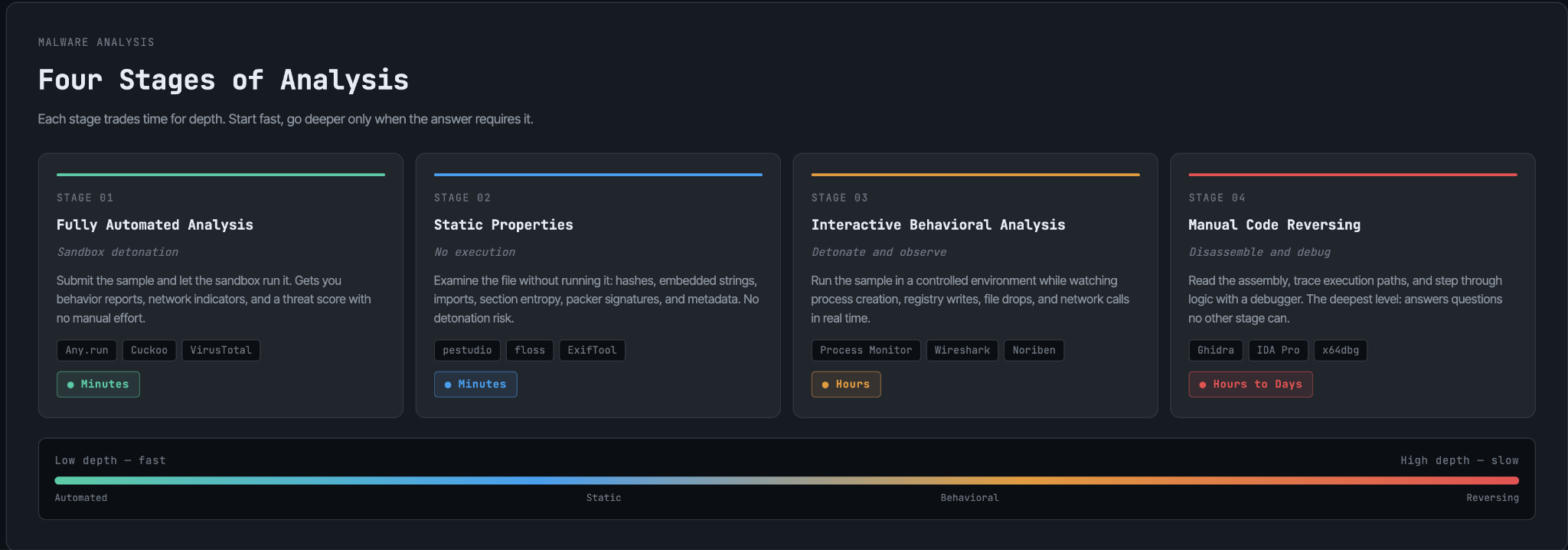
Stage 1, fully automated analysis. Submit the sample to a sandbox (online or in-house) and read the report. It scales to thousands of samples and handles the easy 80 percent. It is the right default for triage.
Stage 2, static properties. Pull hashes, strings, imports, and metadata without running anything. Fast, safe, and enough to classify many samples and decide whether deeper work is justified.
Stage 3, interactive behavioral analysis. Detonate the sample in your own lab and interact with it, feeding it what it wants so it reveals behavior the automated sandbox missed. This is where dormant or evasive samples start to talk.
Stage 4, manual code reversing. Load the binary into a disassembler and debugger and read the logic directly. The most expensive stage and the most complete. It is how you recover encryption keys, decode custom C2 protocols, and prove what a sample does on a path it never took in the sandbox. Reserve it for samples that matter.
The discipline is climbing only as far as you need. A commodity loader rarely justifies stage 4. A novel implant found on a domain controller does.
The malware analysis workflow
A repeatable malware analysis runs as a loop, and step zero is non-negotiable.
- Isolate first. Work in a dedicated lab: virtual machines with snapshots, no path to the production network or the internet (or a fully simulated one), and a clean snapshot to revert to after each run. Detonating live malware on a connected machine is how analysis becomes an incident.
- Triage. Hash, scan reputation, identify the file type, and run an automated sandbox pass. Decide whether this sample needs more than the verdict you already have.
- Static examination. Strings, imports, PE structure, embedded resources. Form a hypothesis about capability and flag the obstacles (packing, obfuscation) you will hit later.
- Dynamic execution. Detonate in the lab with monitoring on file system, registry, processes, and network. Confirm or revise the hypothesis with observed behavior.
- Deep reversing, if warranted. Disassemble and debug to recover the logic the earlier stages could not see: decryption routines, hidden commands, kill switches, full C2 protocol.
- Extract and report. Produce the deliverables: indicators to block, behavioral detections to deploy, the sample's mapping to MITRE ATT&CK techniques, and a written summary of capability and scope for the responders and engineers who consume it.
Step 6 is where analysis earns its keep. Hand the IOCs to the SOC for blocking, the behaviors to detection engineering for YARA and Sigma rules, and the ATT&CK mapping to threat intel. A report nobody can act on is wasted malware analysis.
The malware analysis lab and toolkit
A lab is two prepackaged distributions plus isolation. You do not assemble it tool by tool.
- REMnux is a Linux distribution maintained by Lenny Zeltser that bundles hundreds of free analysis tools for examining files, reversing code, and investigating network traffic.
- FLARE-VM is a Windows distribution from Mandiant (Google) that installs a large catalog of reversing and analysis tools onto a Windows VM, which matters because most malware targets Windows.
Run both as virtual machines with snapshots, isolate them from production, and revert to a clean state between samples. The tools that fill them, by job:
| Tool | Role |
|---|---|
| PEStudio, Detect It Easy (DIE) | Static triage: imports, packing, anomalies |
| IDA Pro, Ghidra | Disassembly and decompilation (Ghidra is the free NSA tool) |
| x64dbg | Debugging and unpacking on Windows |
| CAPE Sandbox | Automated dynamic analysis; unpacks and extracts configs (actively maintained Cuckoo fork) |
| Process Monitor, Process Hacker | Live process, file, and registry monitoring |
| Wireshark, INetSim | Network capture and a simulated internet for safe detonation |
| YARA / YARA-X | Pattern matching to classify families and write detections |
| Volatility | Memory forensics: dump and analyze what ran in RAM |
Two notes on currency. CAPE Sandbox is the actively maintained fork of the original Cuckoo Sandbox project and is the common open-source choice today. YARA-X is the Rust rewrite of YARA and is where active development now lives. Both originals still appear in older guides; reach for the maintained versions.
How malware fights analysis
Malware analysis is adversarial. Authors build samples specifically to waste an analyst's time and break automated tooling. The common techniques:
- Packing and obfuscation. Compress or encrypt the real payload so static analysis sees only a stub. Defeated by unpacking in memory during a dynamic run, then dumping the result.
- Anti-VM and anti-sandbox. Check for virtual-machine artifacts, low core counts, missing user activity, or known sandbox usernames, then exit or run benign code. Defeated by hardened, realistic environments and, for stubborn samples, bare-metal analysis on real hardware.
- Anti-debugging. Detect an attached debugger with calls like
IsDebuggerPresentor timing checks, then alter behavior. Defeated by patching the checks during reversing. - Time bombs and logic bombs. Stay dormant until a date, a command, or a specific environment. Defeated by static reversing, which sees the dormant branch the sandbox never triggered.
- Fileless and living-off-the-land. Run in memory through PowerShell or trusted binaries, leaving little on disk to examine statically. Defeated by memory forensics and behavioral monitoring.
This arms race is exactly why no single approach wins. Static analysis is blind to packed code, dynamic analysis is blind to evasive and dormant code, and the analyst who combines both, then reverses when it matters, is the one who gets the full answer.
Where malware analysis fits
Malware analysis is not a standalone job for most teams. It is a capability that feeds the rest of the security program.
- In the SOC, it turns ambiguous alerts into verdicts and the IOCs that block the threat across the fleet.
- In incident response, it answers scope and impact: what the malware did, what it touched, and what to remediate.
- In threat hunting, the behaviors it extracts become hypotheses, and the IOCs become things to search for across historical data.
- In threat intelligence, behavior and infrastructure tie a sample to a known family or actor and inform what to expect next.
- In detection engineering, the artifacts become durable YARA, Sigma, and SIEM detections that catch the family, not just the file.
The common thread is that analysis converts one sample into reusable defense. Skip it, and you are blocking hashes that change the moment the attacker recompiles.
Getting started with malware analysis
The skill is built on real samples, not slides.
- Build the lab first. Stand up an isolated VM with snapshots, install REMnux or FLARE-VM, and confirm nothing routes to your real network. Learn to revert cleanly before you ever detonate anything.
- Start with static triage. Hashes, strings, imports. Get fluent reading what a PE file tells you before you run it.
- Detonate known-benign and known-malicious test samples. Watch the monitoring tools light up so you know what normal and malicious look like in Process Monitor and Wireshark.
- Work real samples in a safe setting. This is the step that builds instinct, and it is the hardest to get safely.
- End every malware analysis with output. IOCs, a detection rule, an ATT&CK mapping. Analysis that does not produce defense is practice, not work.
The bottom line
Malware analysis is how a defender turns a suspicious file into a decision and a defense. You read it statically, run it dynamically, combine the two, and reverse the code when the sample is worth it, climbing the four stages only as far as the question demands. The output is what matters: indicators to block, behaviors to detect, and an ATT&CK mapping that ties the sample to how the adversary operates, so one piece of malware analysis protects every endpoint against the next variant.
The constraint is rarely the tooling. The tools are mostly free, and the lab fits on one machine. The constraint is the analyst who can read a binary, watch it run, and tell the loader from the targeted implant.
Frequently asked questions
Static analysis reads the file without executing it, which is safe and fast but blind to packed or obfuscated code. Dynamic analysis runs the sample and watches its behavior, which cuts through obfuscation but only reveals the code paths the malware actually takes and can be defeated by sandbox evasion. They cover each other's blind spots.
Common tools include PEStudio and Detect It Easy for static triage, Ghidra and IDA Pro for disassembly, x64dbg for debugging, CAPE Sandbox for automated dynamic analysis, Process Monitor and Wireshark for behavioral monitoring, YARA for classification and detection, and Volatility for memory forensics. REMnux and FLARE-VM bundle these into ready-made analysis environments.
Only in a properly isolated lab. Run samples in virtual machines with snapshots, on a network with no path to production or the live internet (or a simulated one), and revert to a clean state after each run. Detonating live malware on a connected machine turns an analysis into an incident.
Malware analysis is examining a malicious file or piece of code to figure out what it does, how it works, and how to detect and stop it. Analysts use a mix of tools and hands-on investigation, and the result is concrete: indicators to block and behaviors to detect across the environment.
The two fundamental types are static analysis (examining the file without running it: hashes, strings, imports, disassembly) and dynamic analysis (running it in an isolated environment and observing its behavior). Hybrid analysis combines them iteratively, using each to direct the other, and is how most real analysis is done.
The four stages, from easiest to hardest, are fully automated analysis (sandbox), static properties analysis (hashes, strings, imports), interactive behavioral analysis (detonating and interacting in a lab), and manual code reversing (disassembling and debugging the code). Analysts climb only as high as the question requires.