Azure Cloud Security: The SOC Analyst's Complete Detection & Threat Hunting Guide (2026)
Azure Cloud Security: The SOC Analyst's Complete Detection & Threat Hunting Guide (2026)
Azure Cloud Security is not just a product suite; it is an operational discipline. Microsoft Azure provides a broad set of native security controls across identity, networking, data, and compute. But the controls themselves are inert without a SOC analyst who knows how to interpret what they emit, hunt through what they store, and act on what they reveal.
For the modern SOC analyst, Azure has become unavoidable. The majority of enterprise environments run hybrid or fully cloud-native workloads on Azure. Threat actors know this. Advanced persistent threat (APT) groups such as APT29 (Cozy Bear) and LAPSUS$ specifically target Azure Active Directory (now Microsoft Entra ID), Azure Storage accounts, and misconfigured Azure Resource Manager (ARM) permissions to establish persistence, move laterally, and exfiltrate data often without ever touching an endpoint.
This guide is written for the practitioner who works on incidents, builds detection rules, and performs threat hunting inside Azure environments. It is not a product tour. It is a field manual.
The Shared Responsibility Model: Where Microsoft Ends and You Begin
The shared responsibility model is the legal and operational contract between Microsoft and its customers. Understanding it precisely is not theoretical; it defines the gaps in your detection coverage.
| Layer | Microsoft Responsible | Customer Responsible |
|---|---|---|
| Physical datacenter | ✅ | ❌ |
| Hypervisor / Host OS | ✅ | ❌ |
| Network fabric | ✅ | ❌ |
| Virtual Machines (IaaS) | ❌ | ✅ Patching, EDR, OS hardening |
| Azure Active Directory / Entra ID | Availability | ✅ Configuration, MFA, Conditional Access |
| Storage & Databases | Encryption at rest | ✅ Access control, logging, rotation |
| Application layer | ❌ | ✅ Code security, secrets management |
| Security monitoring | Native telemetry | ✅ SIEM integration, alert tuning, hunting |
SOC implication: Microsoft will not alert you if your global admin account has no MFA and gets sprayed with credentials from a Tor exit node unless you have built that detection yourself. That is your responsibility. Own it.
Azure Log Sources Every SOC Analyst Must Master
Visibility in Azure cloud security is a configuration problem before it is a detection problem. The following log sources form the foundation of any Azure-based detection program. Many are not enabled by default.
1. Microsoft Entra ID (Azure AD) Sign-In and Audit Logs
The single highest-value log source in most Azure environments. These logs capture:
- Interactive and non-interactive sign-in attempts.
- Conditional Access policy evaluations (pass/fail/block)
- MFA challenge outcomes.
- Sign-in risk scores from Microsoft Identity Protection.
- Service principal and managed identity authentications.
- Audit changes: role assignments, group membership changes, and application registrations.
Requirement: Entra ID Sign-In and Audit Logs require a P1 or P2 license. If your tenant is on free or Basic, these logs are unavailable. Verify before assuming coverage.
Retention default: 30 days in the portal. Export to Log Analytics Workspace or Event Hub for longer retention and SIEM integration.
2. Azure Activity Log (Control Plane)
The Activity Log covers all ARM (Azure Resource Manager) operations in the control plane. This is where you catch:
- Resource creation, modification, and deletion.
- Role-based access control (RBAC) changes.
- Policy assignments and exemptions.
- Virtual network and firewall rule changes.
- Subscription-level operations.
Detection value: An attacker who gains access to a privileged identity will often pivot through ARM to create persistence, new resources, new service principals, or new role assignments. The Activity Log is your audit trail for this behavior.
3. Azure Diagnostic Logs (Resource-Level)
Each Azure resource type, such as Storage Accounts, Key Vaults, Azure SQL, App Services, and NSGs, emits its own diagnostic logs. These must be individually enabled.
Critical diagnostic logs for SOC analysts:
- Azure Key Vault: Logs every secret read, key operation, and vault access. Key Vault access from an unexpected IP or service principal is a high-fidelity indicator of credential harvesting.
- Azure Storage: Logs blob reads, writes, deletes, and SAS token operations. Bulk blob enumeration or download is a common exfiltration pattern.
- Network Security Group (NSG) Flow Logs: Captures inbound and outbound traffic decisions, allowing and denying at the network layer. Essential for lateral movement detection.
- Azure Firewall Logs: Application and network rule matches, including FQDN-based filtering decisions.
4. Microsoft Defender for Cloud Alerts
Defender for Cloud (formerly Azure Security Center) generates behavioral alerts across workloads: VMs, containers, SQL, Key Vault, Storage, DNS, and ARM itself. These alerts feed directly into Microsoft Sentinel if you have the connector enabled.
Important: Alert fidelity varies significantly by workload type and Defender plan tier. Enable the enhanced Defender plans for the workloads you care about most. The free tier provides posture assessment but limited runtime detection.
➤ See our complete guide to the Alert Triage Process to build a structured triage workflow.
5. Microsoft 365 / Office 365 Unified Audit Log
In hybrid environments, the Microsoft 365 Unified Audit Log captures activity across Exchange Online, SharePoint, OneDrive, Teams, and more. Attackers frequently pivot from Azure AD compromise into M365 data exfiltration. Integrate both log sources.
Azure Identity & Access: The Highest-Signal Attack Surface
For a SOC analyst covering Azure, identity is the perimeter. The majority of successful Azure breaches begin with a compromised identity, often a legitimate one.
Entra ID Attack Patterns
Password Spray Against Entra ID
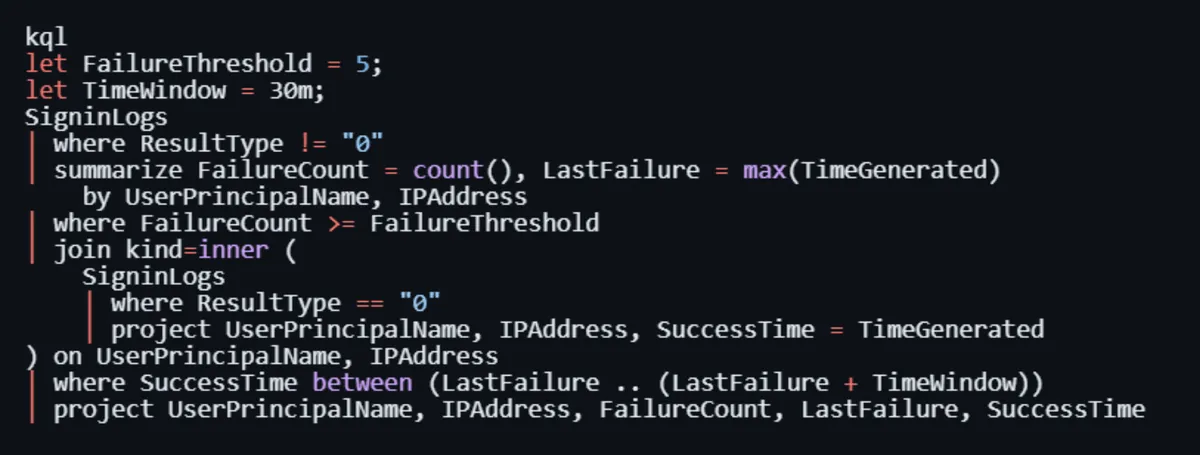
Attackers use low-volume distributed spray attacks against login.microsoftonline.com using known username formats. Indicators: multiple accounts from the same IP showing ResultType: 50126 (invalid credentials) followed by eventual ResultType: 0 (success) on one account.
Adversary-in-the-Middle (AiTM) Phishing
Modern AiTM toolkits (Evilginx, Modlishka) proxy the real Microsoft login page, capturing both the password and the session token, bypassing MFA entirely. Indicators: sign-in from an unknown location, new ASN, token used immediately after issuance without a typical behavioral baseline.
Service Principal Abuse
Service principals are OAuth app identities used by automation. If an attacker registers a malicious app or compromises an existing one, they gain persistent, MFA-exempt access. Watch for: new app registrations, OAuth consent grants, service principal sign-ins from unusual IPs.
Privileged Identity Management (PIM) Abuse
If PIM is configured, watch for: unsolicited role activation requests, activations outside business hours, and activations immediately followed by sensitive resource access.
➤ To see how a real cloud account compromise unfolds end-to-end, walk through our SOC Simulator: M365 case study.
IAM Hardening Signals (For Baseline Building)
Before you can detect anomalies, you must know your baseline:
- Map all accounts with Global Administrator, Privileged Role Administrator, and User Access Administrator roles.
- Identify all service principals with Owner or Contributor rights at the subscription level.
- Enumerate all external guest accounts and their role assignments.
- Verify MFA enrollment rate for privileged accounts (target: 100%)
- Review all Conditional Access policies and identify bypass paths (excluded users, excluded locations)
Top Azure Threat Patterns and Detection Logic
The following are the most commonly observed Azure attack patterns in real-world incident response cases. Each includes the detection rationale a SOC analyst should operationalize.
1. Impossible Travel / Anomalous Sign-In Geography
Pattern: A user authenticates from New York at 09:00 UTC and from Moscow at 09:45 UTC, with a physically impossible travel time.
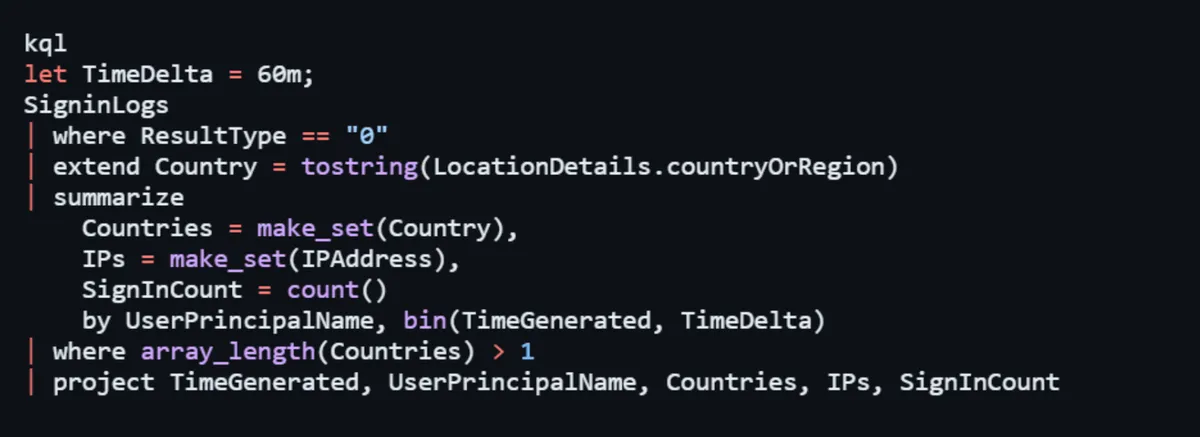
Detection: Microsoft Identity Protection generates ImpossibleTravel risk events natively. Supplement with KQL logic correlating SigninLogs where the same UserPrincipalName has sign-ins from different countries within a configurable time window (e.g., 60 minutes).
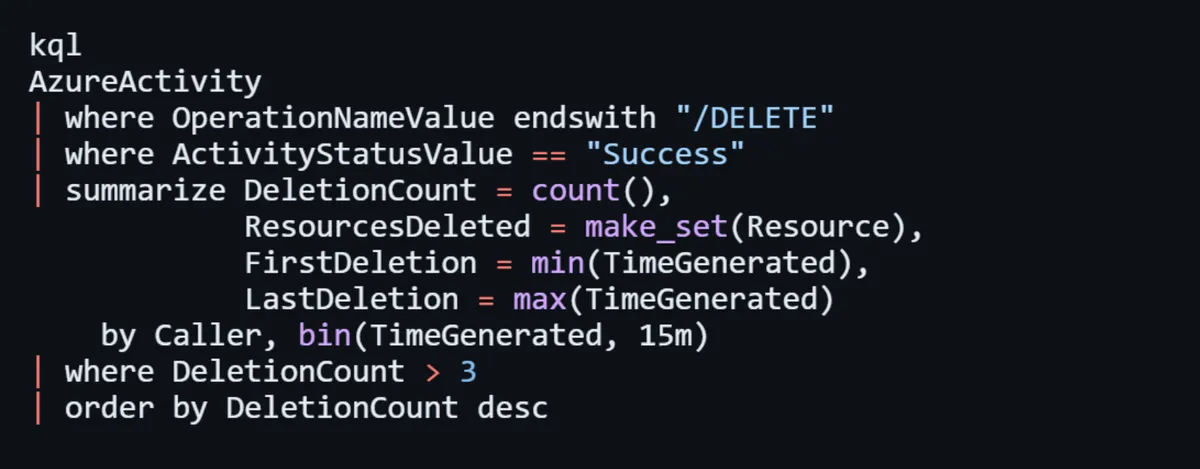
2. Mass Resource Deletion
Pattern: An attacker with compromised credentials attempts to destroy evidence or cause disruption by bulk-deleting Azure resources.
Detection: Monitor AzureActivity for operationName containing "delete" with high frequency from a single caller identity within a short time window. Correlate with operationNameValue = "Microsoft.Resources/subscriptions/resourceGroups/delete".
3. New Owner/Contributor Role Assignment
Pattern: Following initial access, threat actors escalate privileges by assigning themselves or a controlled identity to high-privilege roles at the subscription or resource group level.
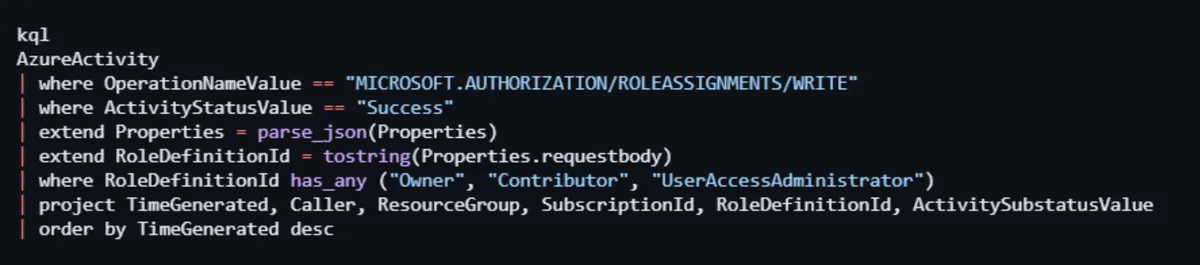
Detection: Alert on AzureActivity where OperationNameValue == "Microsoft.Authorization/roleAssignments/write" and the target role contains "Owner," "Contributor," or "UserAccessAdministrator."
4. Exfiltration via Azure Storage
Pattern: Attacker exports sensitive data by generating SAS tokens or accessing blob storage with compromised credentials.
Detection: StorageBlobLogs look for operationType = GetBlob with high request counts from an IP not seen historically, or GenerateSasToken operations from identities that don't normally do so. Cross-reference with Entra ID sign-in risk scores.
5. Key Vault Secret Enumeration
Pattern: After lateral movement, attackers enumerate Key Vault secrets to harvest credentials stored by application teams.
Detection: AzureDiagnostics where ResourceType == "VAULTS" and OperationName == "SecretGet" alert on bulk reads (more than N secrets in M minutes) from a new or unexpected identity.
➤ Understand the full detection and response lifecycle in our guide, What Is a Data Breach? Detection and Response Full Guide.
KQL Hunting Queries You Can Deploy Today
The following Kusto Query Language (KQL) queries are ready to deploy in Microsoft Sentinel or Log Analytics Workspace.
Hunt 1: Successful Sign-In After Multiple Failures (Brute Force Success)
Hunt 2: New High-Privilege Role Assignment
Hunt 3: Key Vault Bulk Secret Access
Hunt 4: Impossible Travel Detection (Custom)
Hunt 5: Suspicious ARM Resource Deletion Spree
Azure Misconfiguration: The Silent Kill Chain
Misconfigurations are not edge cases; they are the primary entry vector in Azure cloud security incidents. A SOC analyst who understands the misconfiguration landscape can prioritize hunting and contribute to proactive hardening.
Most Dangerous Azure Misconfigurations (SOC Perspective)
1. Public Blob Storage Containers
Storage accounts with AllowBlobPublicAccess enabled and containers set to "anonymous read" expose data without any authentication requirement. Microsoft has moved to disable public access by default since late 2023, but legacy accounts remain exposed. Query AzureActivity for recent changes to storage account public access settings.
2. Overpermissioned Service Principals
Application identities with subscription-level Owner or Contributor rights are a persistence jackpot. These identities often have no MFA and may have credentials stored in pipeline variables or code repositories. Conduct regular audits using Azure RBAC APIs or Microsoft Defender for Cloud's identity recommendations.
3. Disabled Diagnostic Logging
This is both a misconfiguration and a blind spot. Resources with no diagnostic logging configured silently process and emit data that you can never see. Use Azure Policy with the DeployIfNotExists effect to enforce diagnostic settings at scale.
4. Missing Conditional Access for Admin Roles
If your Conditional Access policies exclude Global Admins, PIM-activated users, or break-glass accounts from MFA requirements, you have a critical gap. Audit all CA policy exclusions regularly.
5. Publicly Exposed Management Ports (RDP/SSH)
NSGs that allow inbound TCP 3389 or 22 from 0.0.0.0/0 (any source) to Azure VMs are continuously scanned and attacked. Use NSG Flow Logs to identify if these rules exist and whether connections are being made to them.
➤ Read our Disk Forensics: SOC Analyst Playbook to continue your host-level analysis.
6. No Resource Locks on Critical Infrastructure
Without CanNotDelete or ReadOnly locks on critical resources, a compromised identity can wipe out infrastructure in seconds. Resource lock changes also appear in the Activity Log and should trigger alerts.
Microsoft Sentinel: Building a Detection-First SOC Pipeline
Microsoft Sentinel is Azure's cloud-native SIEM and SOAR platform. For SOC analysts working in Azure environments, it is the primary orchestration layer for detection, investigation, and response.
Connector Priority for Azure Coverage
Enable these data connectors before anything else:
- Azure Active Directory / Entra ID Sign-in logs, audit logs, provisioning logs.
- Azure Activity Subscription-level control plane operations.
- Microsoft Defender for Cloud Cross-workload behavioral alerts.
- Microsoft 365 Defender Unified XDR signal from M365 and endpoints.
- Azure Key Vault Via diagnostic settings + Sentinel connector.
- Azure Network Watcher / NSG Flow Logs: Network layer visibility.
- Office 365 Email, SharePoint, and Teams activity.
Alert Rule Architecture
Organize your detection coverage across three tiers:
- Tier 1 Scheduled Analytics Rules (KQL-based): Custom detection logic running against raw logs. Use the queries from this guide as your foundation.
- Tier 2 Microsoft Security Incident Creation: Auto-import alerts from Defender products as Sentinel incidents. Set appropriate severity mappings.
- Tier 3 Anomaly Rules (UEBA): Sentinel's built-in User and Entity Behavior Analytics (UEBA) models provide ML-based baseline deviation alerts for entities like users and hosts.
SOAR Playbooks for Azure Incidents
Automate first-response actions using Sentinel Logic App playbooks:
- Account Compromise: On high-severity Entra ID alert → auto-revoke user sessions via Microsoft Graph API → notify SOC channel → create incident with enrichment.
- Suspicious Key Vault Access: On bulk secret access alert → disable the offending service principal → notify vault owner.
- Malicious IP Sign-In: On sign-in from known-bad IP (TI match) → block IP in named location → force MFA re-registration.
Azure Cloud Security Checklist for SOC Teams
Use this checklist when onboarding a new Azure tenant or auditing an existing environment:
Logging & Visibility
- Entra ID Sign-In Logs flowing to Sentinel (P1/P2 license confirmed)
- Entra ID Audit Logs are flowing to Sentinel.
- Azure Activity Log flowing to Sentinel.
- Key Vault diagnostic logging is enabled for all vaults.
- Storage account logging is enabled for all critical accounts.
- NSG Flow Logs are enabled and flowing to Storage/Log Analytics.
- Defender for Cloud enhanced plans enabled (at minimum: Servers, Key Vault, Storage, ARM)
- Log retention set to minimum 90 days (1 year recommended for compliance)
Identity & Access
- MFA enforced for all privileged roles via Conditional Access (no exclusions)
- PIM is configured for Global Admin, Privileged Role Admin, and User Access Admin.
- No service principals with Owner rights at subscription level (without justification)
- Guest/external accounts audited and scoped.
- Break-glass accounts are monitored with a dedicated alert rule.
Detection Coverage
- Brute force/spray detection rule is active.
- Impossible travel rule active.
- New privileged role assignment alert is active.
- Key Vault bulk access alert is active.
- ARM mass deletion alert active.
- Sentinel UEBA enabled.
Posture & Hardening
- Azure Policy enforcing diagnostic settings (DeployIfNotExists)
- Public blob access disabled by policy.
- No NSG rules allowing RDP/SSH from 0.0.0.0/0.
- Resource locks on production subscriptions.
- Defender for Cloud Secure Score is reviewed monthly.
Conclusion: Detection-Led Azure Cloud Security
Azure cloud security is not a static configuration it is a continuous operational practice. For the SOC analyst, Azure demands a shift in mindset: from monitoring endpoints and firewalls to understanding cloud-native telemetry, control plane operations, identity signals, and API-driven attacker behaviors.
The defenders who will be most effective in Azure environments in 2026 are those who:
- Know which log sources exist, which are on by default, and which must be configured.
- Understand the Entra ID / Microsoft Entra ecosystem deeply enough to detect AiTM phishing and token theft.
- Can write KQL queries that translate attacker TTPs into detection logic.
- Use Microsoft Sentinel not just as a SIEM but as a detection engineering platform.
- Treat misconfiguration hunting as part of their regular threat hunting cycle, not the cloud team's problem.
Azure exposes an enormous attack surface. It also provides extraordinary telemetry if you configure it, collect it, and act on it. The guidance above gives you the foundation. Build on it, tune it against your environment, and treat every incident as a signal to improve your detection coverage.
The cloud attackers are not slowing down. Neither should you.
References:
- Microsoft Sentinel KQL Reference Documentation
- MITRE ATT&CK for Cloud: Azure
- Azure Security Benchmark v3