Introduction
Wowza Innotech hosted an onsite customer meetup at their headquarters. Each session concluded with attendees completing a satisfaction survey on an internal workstation accessible only within the building's network. During one session, a customer noticed the survey page redirected them to a suspicious external site prompting a file download. They reported it immediately to the IT and Incident Response (IR) team.
Initial triage confirmed the survey workstation had been compromised. Internal interviews revealed that one attendee had a heated disagreement with staff over product performance — an individual with a history of misusing technology when upset. Given the timing, the IR team suspected the compromise occurred during the meeting itself, likely by someone physically present on the network.
Fortunately, the network operations team had been capturing traffic during the event for monitoring purposes. This packet capture was handed over for deeper analysis.
Analysis
Q1: The IR team believes the attacker was physically present on the internal network during the meetup. To begin attribution, we need to identify the device they used. What is the MAC address associated with the threat actor's device?
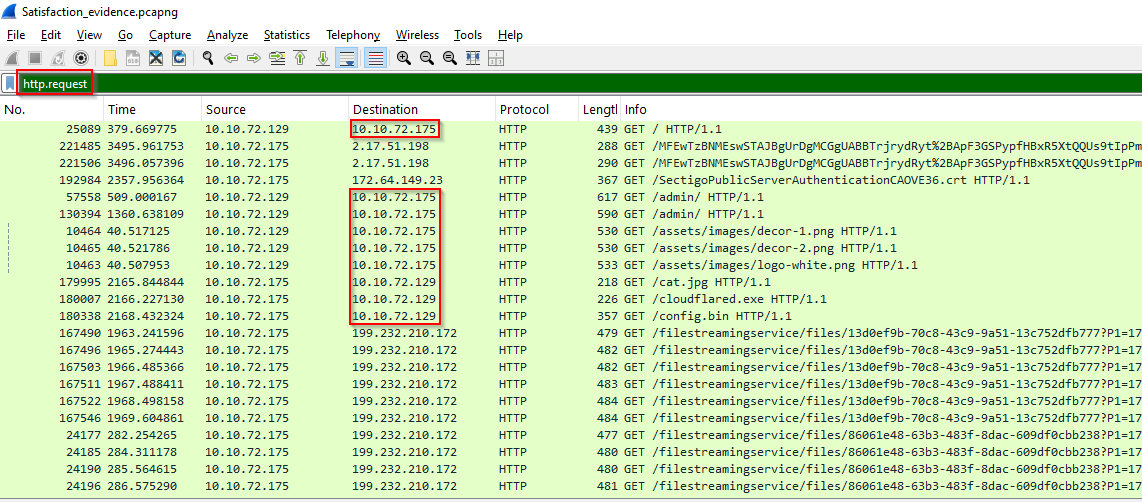
Since the traffic is on the internal network, let's inspect the http packets since they would carry information in plain text that can give us insight. Using the filter http.request we can see there are multiple occurrences for the IP 10.10.72.175 as destination, which indicates this is the IP hosting the web service locally.
First I will change the Time column to display UTC time by right-clicking on the Time column > column preferences > in front of Time choose type as UTC date as YYYY-MM-DD and time. Now narrowing down with the server private IP with this filter http.request.method==POST and ip.dst==10.10.72.175, focusing on POST requests makes it easier to spot if anything unusual was sent to the server, not requested from it.

Unlock Your Full Learning Experience with BlueYard Labs
Sign up to track your progress, unlock exclusive labs, and showcase your achievements—begin your journey now!
Join for Free