SOC Simulator: Malware Download Alert Investigation from Browser Telemetry
Malware Download Alert Investigation from Browser Telemetry
A Practical SOC Case Study for Detecting and Responding to Suspicious File Downloads
In modern Security Operations Centers (SOC), one of the most frequent and deceptively simple alerts is the malware download alert triggered by browser telemetry or web proxy logs. While these alerts are high in volume, they often represent the initial foothold of real-world attacks such as malware delivery, credential harvesting, or staged payload execution.
This case study provides a step-by-step SOC investigation workflow focused on analyzing a suspicious file download event. It is designed to simulate how Tier 1 and Tier 2 analysts operate in real environments, combining endpoint telemetry, proxy logs, and threat intelligence to determine whether a downloaded file resulted in compromise.
The goal is not just detection, but decision-making under uncertainty, which is where real SOC skills are built.
Scenario Overview: Suspicious Executable Download Detected
The investigation begins with a high-severity alert generated from browser and proxy telemetry. This type of alert is commonly triggered by tools such as secure web gateways, endpoint detection platforms, or cloud proxies.
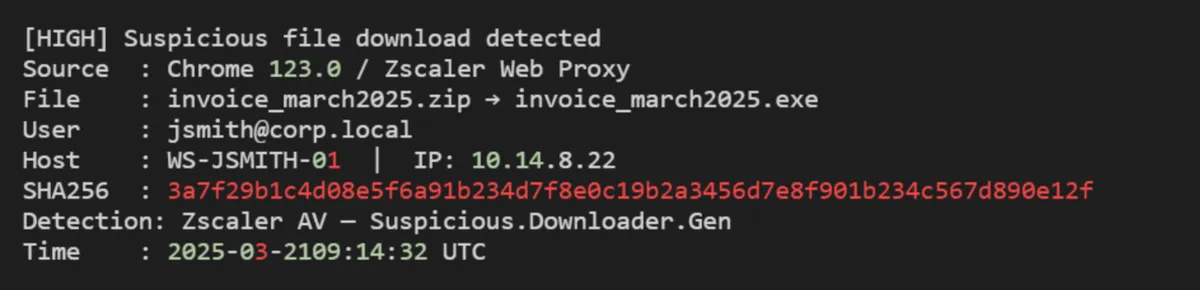
At first glance, this alert suggests a potentially malicious file disguised as a business document, a classic social engineering lure. However, experienced analysts know that a download alone does not confirm compromise.
➤ The critical first question is: Did the file actually execute on the endpoint?
Everything that follows in the investigation depends on answering this accurately.
Step 1: Execution Check, Did the File Run?
The initial alert confirms delivery, not execution. This distinction is crucial because many downloaded files are never opened, especially if users recognize suspicious behavior.
To determine execution, analysts pivot into endpoint telemetry sources such as EDR logs, Windows event logs, or process creation tracking.
For a deeper look at USB insider threat detection, see our guide: USB insider threat detection.
Example Query (EDR / Sysmon-style)

What to Look For
- Process creation events (Event ID 4688 or Sysmon Event ID 1)
- Parent-child relationships (e.g., chrome.exe → invoice_march2025.exe)
- Execution timestamps match download time.
If no execution is found, the case may be downgraded. If execution is confirmed, the investigation escalates immediately.
Step 2: Process Tree Analysis: Understanding Execution Context
Once execution is confirmed, the next step is to reconstruct the process tree to understand how the file behaved.
This helps answer key questions:
- Was the file launched directly by the user?
- Did it spawn additional processes?
- Is there evidence of staged payload delivery?
Example Query

Indicators of Malicious Behavior
- Spawning of scripting engines (powershell.exe, cmd.exe)
- Use of LOLBins (Living-off-the-Land binaries)
- Rapid child process chaining
A legitimate file rarely spawns multiple command-line processes immediately after execution. This is often a strong indicator of malware staging or downloader behavior.
Step 3: File Analysis and Hash Reputation
With execution confirmed, analysts pivot to threat intelligence and hash reputation services to determine whether the file is known malware.
Example Lookup

Key Checks
- Detection ratio in VirusTotal or similar platforms.
- Known malware family classification.
- Behavioral tags such as "downloader", "trojan," or "dropper."
If the hash is unknown, the file should be submitted to a sandbox for dynamic analysis.
Step 4: Network Activity Investigation
Malware rarely operates in isolation. After execution, it typically attempts to communicate with external infrastructure.
This step focuses on identifying command-and-control (C2) communication or payload retrieval.
Example Query

Red Flags
- Connections to newly registered domains.
- Unusual geographic destinations.
- Encrypted traffic to unknown endpoints.
Correlating network activity with execution timing is critical for confirming malicious intent.
Step 5: Persistence Mechanism Detection
If the malware executed successfully, it may attempt to maintain access by establishing persistence.
Analysts should investigate:
- Registry run keys
- Scheduled tasks
- Startup folder modifications
Example Query

Persistence mechanisms indicate a higher level of compromise and often require immediate containment actions.
Step 6: Lateral Movement and Impact Assessment
At this stage, the investigation shifts from detection to impact analysis.
Key questions include:
- Did the malware attempt credential harvesting?
- Were other systems contacted internally?
- Is there evidence of privilege escalation?
This phase determines whether the incident is isolated or part of a broader intrusion.
Step 7: Containment and Response Actions
Once malicious activity is confirmed, containment must be executed quickly and precisely.
Common Response Actions
- Isolate the affected endpoint.
- Block malicious hashes and domains.
- Reset compromised user credentials.
- Initiate threat hunting across the environment.
Proper containment prevents escalation into ransomware, data exfiltration, or full domain compromise.
Key Takeaways for SOC Analysts
This case study highlights a critical reality in SOC operations: alerts are only the starting point. The real skill lies in correlating telemetry, validating execution, and understanding attacker behavior.
Analysts who jump directly into threat intelligence without confirming execution often waste valuable time. Conversely, those who follow a structured workflow can quickly determine whether an alert represents a real threat.
The ability to move from alert → execution → behavior → impact is what separates beginner analysts from operational defenders.
Why This Scenario Matters in Real SOC Environments?
Malware download alerts from browser telemetry are among the most common signals in enterprise environments. However, they are also one of the most misunderstood.
Attackers rely heavily on:
- Social engineering (invoice-themed lures)
- File masquerading (ZIP → EXE transitions)
- Living-off-the-land techniques
This makes practical investigation skills far more valuable than theoretical knowledge.
Final Thought
If you're digging into scenarios like this, the real question becomes:
How often do you actually practice full investigations end-to-end, not just theory, but correlating logs, validating execution, and tracing attacker behavior?
Because that gap between "knowing" and "doing" is exactly where most SOC analysts struggle… and where hands-on, real-world style training starts to make a difference.
Ready to test your skills? Apply what you've learned in the AsyncRAT Lab.
Looking to go deeper? Explore a full range of malware analysis training designed to simulate real-world incidents and sharpen your investigation workflow across different attack vectors.
Browse all labs in the CyberDefenders Cyber Range.